
Fraction Addition Demonstration by K NIRMALA DEVI
Loading the math board and drawing, please wait…
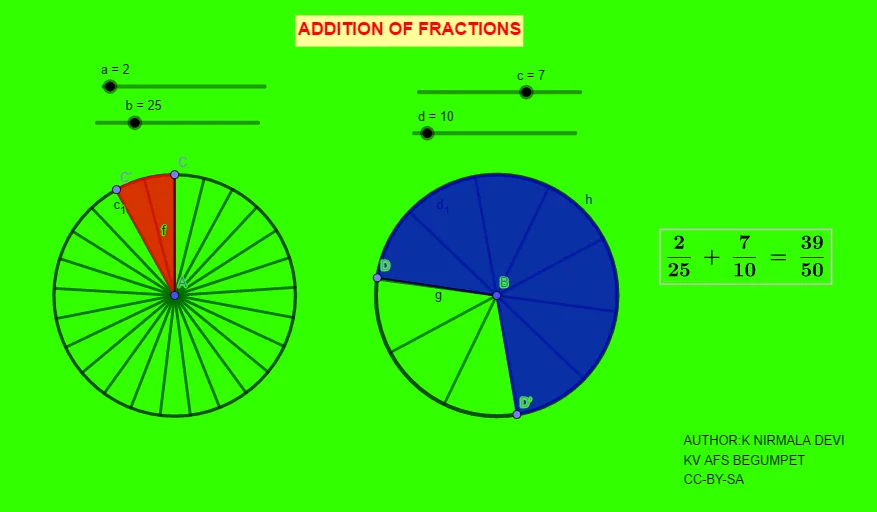
This example demonstrates the addition of fractions, visually representing the process of adding fractions. The core math concepts involved include fraction operations, pie chart representation, and geometric transformations. Key construction elements from the GeoGebra commands/objects used are Circle, Point, Segment, Sequence, Rotate, Angle, CircleSector, and LCM. Suitable for middle school mathematics education, helping students understand the geometric meaning and visual representation of fraction addition.
GeoGebra Commands & Parameters
Circle(A, 3) → c_1Circle(B, 3) → d_1Point(c_1) → CSegment(C, A) → fPoint(d_1) → DSegment(D, B) → gSequence(Segment[A, Rotate[C, f°, A]], f, (360°) / b, 360, 360 / b) → l1Rotate(C, (360° * a / b), A) → C'Angle(C, A, C') → αSequence(Segment[B, Rotate[D, g°, B]], g, (360°) / d, 360, 360 / d) → l2Rotate(D, (-((360 * (c / d)°))), B) → D'Angle(D', B, D) → βCircleSector(A, C, C') → eLCM(b, d) → sCircleSector(B, D', D) → h