
Ford Circles: Visualizing Fractions via Tangent Circles
Loading the math board and drawing, please wait…
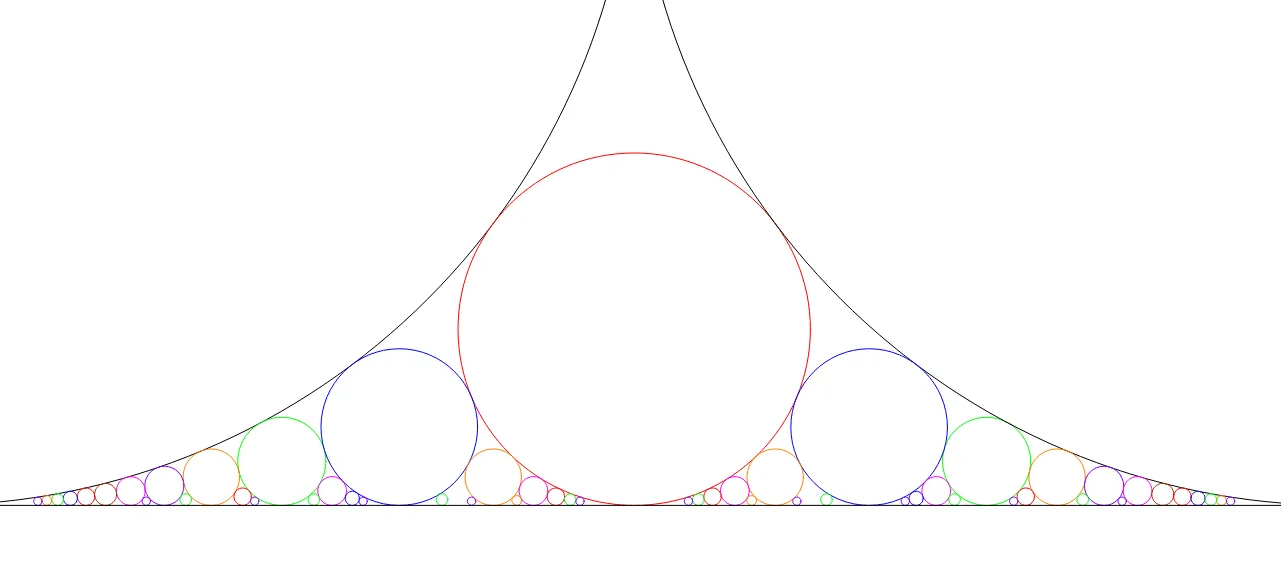
This GeoGebra example demonstrates the construction of Ford circles, where for each reduced fraction p/q, a circle of radius 1/(2q²) is drawn tangent to the number line at (p/q, 0). All Ford circles are either mutually tangent or disjoint, creating a beautiful fractal-like arrangement. Core mathematical concepts include rational numbers, fractions, sequences, tangent properties of circles, and connections to continued fractions in number theory. Construction highlights: the example uses the Circle command to generate multiple circles and the Segment command to draw auxiliary segments; objects such as c, d, e, f, g, h, k and their indexed variants (c_1, d_1, etc.) are created systematically to build families of circles with different denominators. This is suitable for high school to undergraduate mathematics education, offering an intuitive visualization of rational number distribution and circle tangency, ideal for interdisciplinary lessons in number theory, geometry, and sequences.
GeoGebra Commands & Parameters
Circle((0, 0.5), 0.5) → cCircle((0.5, 0.125), 0.125) → dCircle((0.25, 0.03125), 0.03125) → eCircle((0.75, 0.03125), 0.03125) → fCircle((1, 0.5), 0.5) → gCircle((0.3333333333333333, 0.05555555555555555), 0.05555555555555555) → hCircle((0.6666666666666666, 0.05555555555555555), 0.05555555555555555) → kCircle((0.2, 0.02), 0.02) → pCircle((0.4, 0.02), 0.02) → qCircle((0.6, 0.02), 0.02) → rCircle((0.8, 0.02), 0.02) → sCircle((0.16666666666666666, 0.013888888888888888), 0.013888888888888888) → tCircle((0.8333333333333334, 0.013888888888888888), 0.013888888888888888) → c_1Segment((0, 0), (1, 0)) → aCircle((0.14285714285714285, 0.01020408163265306), 0.01020408163265306) → d_1Circle((0.2857142857142857, 0.01020408163265306), 0.01020408163265306) → e_1Circle((0.42857142857142855, 0.01020408163265306), 0.01020408163265306) → f_1Circle((0.5714285714285714, 0.01020408163265306), 0.01020408163265306) → g_1Circle((0.7142857142857143, 0.01020408163265306), 0.01020408163265306) → h_1Circle((0.8571428571428571, 0.01020408163265306), 0.01020408163265306) → k_1Circle((0.125, 0.0078125), 0.0078125) → p_1Circle((0.875, 0.0078125), 0.0078125) → q_1Circle((0.1111111111111111, 0.006172839506172839), 0.006172839506172839) → r_1Circle((0.2222222222222222, 0.006172839506172839), 0.006172839506172839) → s_1Circle((0.4444444444444444, 0.006172839506172839), 0.006172839506172839) → t_1Circle((0.5555555555555556, 0.006172839506172839), 0.006172839506172839) → c_2Circle((0.7777777777777778, 0.006172839506172839), 0.006172839506172839) → d_2Circle((0.8888888888888888, 0.006172839506172839), 0.006172839506172839) → e_2Circle((0.1, 0.0050), 0.0050) → f_2Circle((0.3, 0.0050), 0.0050) → g_2Circle((0.7, 0.0050), 0.0050) → h_2Circle((0.9, 0.0050), 0.0050) → k_2Circle((0.09090909090909091, 0.004132231404958678), 0.004132231404958678) → p_2Circle((0.18181818181818182, 0.004132231404958678), 0.004132231404958678) → q_2Circle((0.2727272727272727, 0.004132231404958678), 0.004132231404958678) → r_2Circle((0.36363636363636365, 0.004132231404958678), 0.004132231404958678) → s_2Circle((0.45454545454545453, 0.004132231404958678), 0.004132231404958678) → t_2Circle((0.5454545454545454, 0.004132231404958678), 0.004132231404958678) → c_3Circle((0.6363636363636364, 0.004132231404958678), 0.004132231404958678) → d_3Circle((0.7272727272727273, 0.004132231404958678), 0.004132231404958678) → e_3Circle((0.8181818181818182, 0.004132231404958678), 0.004132231404958678) → f_3Circle((0.08333333333333333, 0.003472222222222222), 0.003472222222222222) → h_3Circle((0.4166666666666667, 0.003472222222222222), 0.003472222222222222) → k_3Circle((0.5833333333333334, 0.003472222222222222), 0.003472222222222222) → p_3Circle((0.9166666666666666, 0.003472222222222222), 0.003472222222222222) → q_3Circle((0.9090909090909091, 0.004132231404958678), 0.004132231404958678) → r_3Circle((0.07692307692307693, 0.0029585798816568047), 0.0029585798816568047) → s_3Circle((0.15384615384615385, 0.0029585798816568047), 0.0029585798816568047) → t_3Circle((0.23076923076923078, 0.0029585798816568047), 0.0029585798816568047) → c_4Circle((0.3076923076923077, 0.0029585798816568047), 0.0029585798816568047) → d_4Circle((0.38461538461538464, 0.0029585798816568047), 0.0029585798816568047) → e_4Circle((0.46153846153846156, 0.0029585798816568047), 0.0029585798816568047) → f_4Circle((0.5384615384615384, 0.0029585798816568047), 0.0029585798816568047) → g_4Circle((0.6153846153846154, 0.0029585798816568047), 0.0029585798816568047) → h_4Circle((0.6923076923076923, 0.0029585798816568047), 0.0029585798816568047) → k_4Circle((0.7692307692307693, 0.0029585798816568047), 0.0029585798816568047) → p_4Circle((0.8461538461538461, 0.0029585798816568047), 0.0029585798816568047) → q_4Circle((0.9230769230769231, 0.0029585798816568047), 0.0029585798816568047) → r_4
AI Drawing Prompt Reference
Draw a horizontal number line from 0 to 1. Above this line, construct a family of circles each tangent to the line at a rational point (p/q, 0), with radius equal to 1/(2q²). Start with the two largest circles of radius 0.5 tangent at 0 and 1, then add a circle of radius 0.125 at 1/2, circles of radius 0.03125 at 1/4 and 3/4, and circles of radius 0.0556 at 1/3 and 2/3. Continue adding circles for fractions with denominators 5, 6, 7, 8, 9, 10, 11, 12, and 13, each radius shrinking as the denominator squared increases. Ensure all circles are either mutually tangent or disjoint, creating a fractal-like arrangement. Finally, draw a segment connecting the endpoints 0 and 1 as the baseline.
The prompt above was compiled from the original drawing commands and is for reference only.