
Fitting a Sine Equation to a Curve
Loading the math board and drawing, please wait…
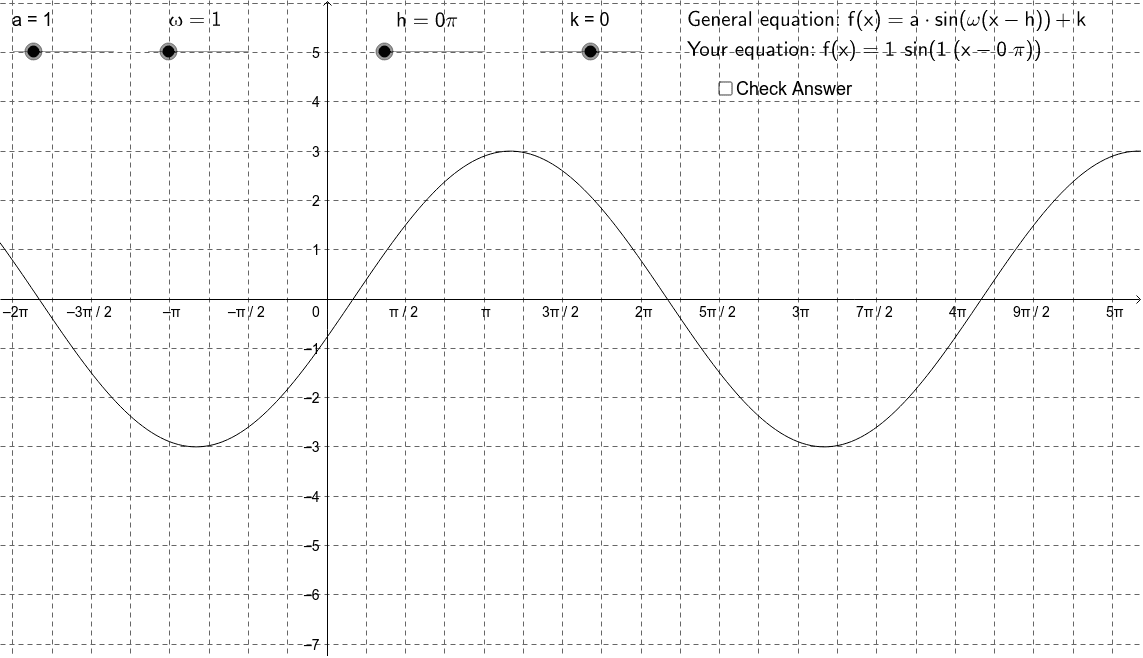
This example demonstrates how to fit a sine equation to a given curve, illustrating the process of matching functions with data. Core math concepts include sine functions, continuity, equation solving, and exponent operations. It uses GeoGebra commands like Element and If to construct and adjust parameters for curve fitting, suitable for high school and above learners to understand function fitting and trigonometric applications.
GeoGebra Commands & Parameters
Element(A_L, Random[1, 4]) → A_1Element(ω_L, Random[1, 6]) → ω_1Element(h_L, Random[1, 16]) → h_1Element(k_L, Random[1, 7]) → k_1If(a ≟ A_1 ∧ ω ≟ ω_1 ∧ ((h * 3.141592653589793) ≟ h_1 - (6 * 3.141592653589793 / ω_1) ∨ (h * 3.141592653589793) ≟ h_1 - (4 * 3.141592653589793 / ω_1) ∨ (h * 3.141592653589793) ≟ h_1 - (2 * 3.141592653589793 / ω_1) ∨ (h * 3.141592653589793) ≟ h_1 ∨ (h * 3.141592653589793) ≟ h_1 + (2 * 3.141592653589793 / ω_1) ∨ (h * 3.141592653589793) ≟ h_1 + (4 * 3.141592653589793 / ω_1) ∨ (h * 3.141592653589793) ≟ h_1 + (6 * 3.141592653589793 / ω_1)) ∧ k ≟ k_1, 1, 0) → correct
AI Drawing Prompt Reference
Draw a sine curve that fits a given curve. First, set the amplitude A to a random number between 1 and 4, the angular frequency ω to a random number between 1 and 6, the phase shift h to a random number between 1 and 16, and the vertical shift k to a random number between 1 and 7. Then, adjust h and ω so that h times π equals h_1 minus a specific fraction of π divided by ω_1, and k equals k_1, to ensure the sine curve matches the given curve.
The prompt above was compiled from the original drawing commands and is for reference only.