
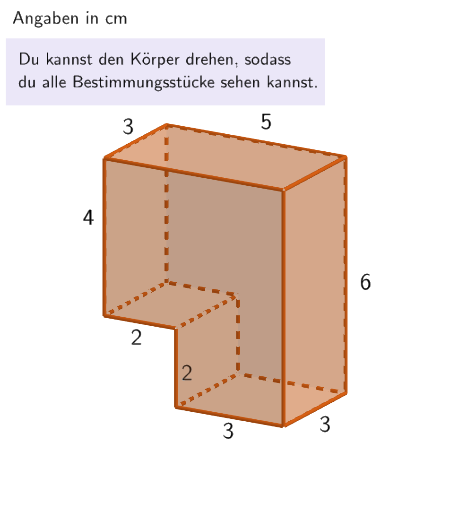
Find the volume of a composite solid by clever completion in GeoGebra 3D
Loading the math board and drawing, please wait…
In collections
Ⓔ Volumen zusammengesetzter Körper aus Quader und Würfel
This example demonstrates how to determine the volume of a composite solid in GeoGebra 3D using two complementary ideas: decomposing the body into unit cubes and computing the volume by cleverly completing it into an appropriate cuboid (then accounting for the overlap/removed part equivalently). Key mathematics includes the cuboid volume formula V = length × width × height, the volume-as-counting principle via unit cubes, and the idea of volume invariance under equivalent rearrangements/completions. Construction-wise, the model leverages commands such as Translate and Volume to manage 3D placement and compute volumes, Element/Textfield/LaTeX to present expressions, Sum and If to assemble results and validate answers, and Shuffle/Corner to randomize the question/answers. Objects like listSolution, correctInputBox*, and step lists support guided, step-by-step learning with both multiple-choice and fill-in/open responses. Suitable for grades around 5–6 or early middle-school, especially for interactive practice and formative assessment on solid geometry and volume reasoning.
GeoGebra Commands & Parameters
Translate({Prism[Polygon[(-2.5, -1.5, -1), (-2.5, -1.5, -1) + (2, 0), (-2.5, -1.5, -1) + (2, 3), (-2.5, -1.5, -1) + (0, 3)], 2]}, Vector[(-0.001, 0, -0.001 - dy)]) → object02Volume(object02(1)) → sol2Translate({Prism[Polygon[(-0.5, 1.5), (-0.5, 1.5) + (3, 0), (-0.5, 1.5) + (3, 0, 2), (-0.5, 1.5) + (0, 0, 2)], (-0.5, -1.5)]}, Vector[(0, 0, ((-dz)) / 2 - 1)]) → object122HintWaagrecht1Element(randomQuestions, Mod[questionCount, Length[randomQuestions]] + 1) → randomQuestionElement(allQuestions, randomQuestion) → actualQuestionShuffle(Sequence[Element[actualQuestion, i], i, 2, numberOfAnswers + 1]) → actualAnswersShuffled, {?, ?, ?, ?, ?, ?}Element(actualAnswersShuffled, 3) → actualAnswer03Element(actualAnswersShuffled, 2) → actualAnswer02Element(actualAnswersShuffled, 1) → actualAnswer01Element(actualAnswersShuffled, 4) → actualAnswer04Element(actualAnswersShuffled, 5) → actualAnswer05Element(actualAnswersShuffled, 6) → actualAnswer06Element(actualAnswer06, 2) → chk06ExpectedElement(actualAnswer05, 2) → chk05ExpectedElement(actualAnswer04, 2) → chk04ExpectedElement(actualAnswer01, 2) → chk01ExpectedElement(actualAnswer02, 2) → chk02ExpectedElement(actualAnswer03, 2) → chk03ExpectedCone((0, 0, 2), (0, 0, 5), 1) → figur022kegel, figur012kegel_{2}, figur012kegel_{3}Cone(((-2.7755575615628914E-17), 0, 1), ((-2.7755575615628914E-17), 0, -3), 1.5) → figur031kegel, figur021kegel_{2}, figur021kegel_{3}Cone((0, 0, 1), (0, 0, 4), 2.5) → figur042kegel, figur032kegel_{2}, figur032kegel_{3}Cone((0, 0, 1), (0, 0, 5), 1.5) → figur062kegel, figur062kegel_{2}, figur062kegel_{3}Textfield(input1) → InputBox1LaTeX(randomQuestion, true, true) → text1Remove(l1, {SelectedElement[l1]}) → l2Textfield(input2) → InputBox2LaTeX(page, true, true) → text5Sum({attemptCountInputBox1, attemptCountInputBox2}) → attemptCountTextfield(input3) → InputBox3If(page ≟ 2, showQuader2, page ≟ 8, correctInputBox3, true, page ≟ 4, correctInputBox1, page ≟ 5, dy ≥ 1.78, page ≟ 6, correctInputBox2, page ≟ 7, sliderGrey ≥ 0.97) → fixedCornerThreeD(-1, 11) → viewActual
AI Drawing Prompt Reference
Draw a composite solid made up of several geometric shapes, including a base and a tall cone. The base consists of multiple stacked unit cubes, and the cone sits atop the base, forming an irregular three-dimensional shape. Use transparency to reveal the internal structure, and label key dimensions such as the length, width, and height of the base, as well as the height of the cone, for volume calculation.
The prompt above was compiled from the original drawing commands and is for reference only.