
Ferris Wheel and Trigonometry
Loading the math board and drawing, please wait…
In collections
Math Year 4 Unit 1
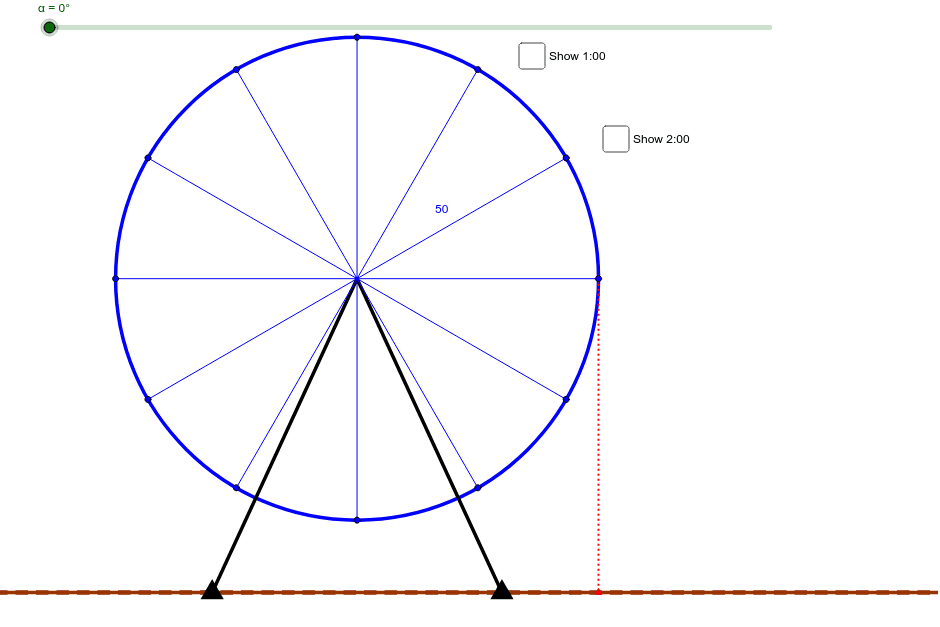
This example demonstrates the motion of a Ferris wheel, involving core trigonometric concepts. By rotating a point on a circle, it simulates the operation of a Ferris wheel. It uses commands like Circle, Rotate, Angle, and Line segment in GeoGebra, suitable for high school students learning trigonometry.
GeoGebra Commands & Parameters
Circle(C, 50) → cSegment(C, G1) → aSegment(C, G2) → bRotate(Zero, α, C) → Zero'Angle(Zero, C, Zero') → βSegment(C, Zero') → dRotate(Zero, 30° + α, C) → Zero'_1Angle(Zero, C, Zero'_1) → γSegment(C, Zero'_1) → eRotate(Zero, 60° + α, C) → Zero'_2Angle(Zero, C, Zero'_2) → δSegment(C, Zero'_2) → fRotate(Zero, 90° + α, C) → Zero'_3Angle(Zero, C, Zero'_3) → εSegment(Zero'_3, C) → gRotate(Zero, 120° + α, C) → Zero'_4Angle(Zero, C, Zero'_4) → ζSegment(Zero'_4, C) → hRotate(Zero, 150° + α, C) → Zero'_5Angle(Zero, C, Zero'_5) → ηSegment(Zero'_5, C) → iRotate(Zero, 180° + α, C) → Zero'_6Angle(Zero, C, Zero'_6) → θSegment(Zero'_6, C) → jRotate(Zero, 210° + α, C) → Zero'_7Angle(Zero, C, Zero'_7) → ιSegment(Zero'_7, C) → kRotate(Zero, 240° + α, C) → Zero'_8Angle(Zero, C, Zero'_8) → κSegment(Zero'_8, C) → lRotate(Zero, 270° + α, C) → Zero'_9Angle(Zero, C, Zero'_9) → λSegment(Zero'_9, C) → mRotate(Zero, 300° + α, C) → Zero'_{10}Angle(Zero, C, Zero'_{10}) → μSegment(Zero'_{10}, C) → nRotate(Zero, 330° + α, C) → Zero'_{11}Angle(Zero, C, Zero'_{11}) → νSegment(Zero'_{11}, C) → pLine(G1, G2) → qOrthogonalLine(Zero', q) → rIntersect(r, q) → ASegment(Zero', A) → sOrthogonalLine(Zero'_1, d) → tIntersect(d, t) → BSegment(Zero'_1, B) → a_1Angle(Zero'_1, B, C) → ξAngle(B, C, Zero'_1) → οOrthogonalLine(Zero'_2, d) → b_1Intersect(b_1, d) → DSegment(Zero'_2, D) → c_1Distance(D, C) → distanceDCAngle(D, C, Zero'_2) → ρAngle(Zero'_2, D, C) → σ
AI Drawing Prompt Reference
Draw a circle with a center and a radius. Rotate a line segment from the center to the circumference by different angles, creating multiple segments. Connect the endpoints of these segments to form a polygon. From the center, draw lines to the endpoints of each rotated segment. Add a point at the center and draw perpendicular lines from this point to the circle, finding intersections with the circle. Connect these intersections to the corresponding rotated points.
The prompt above was compiled from the original drawing commands and is for reference only.