
Factorization of Quadratic Polynomials
Loading the math board and drawing, please wait…
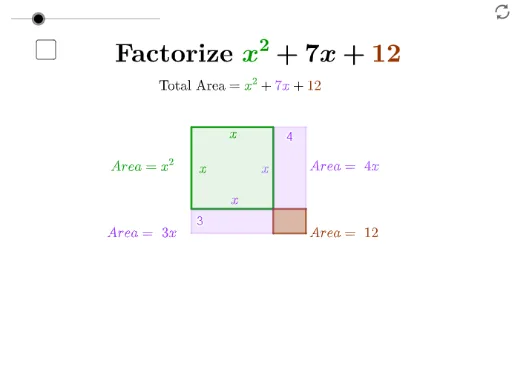
This example uses area to explain the factorization of quadratic functions. It demonstrates how to visually understand algebraic expressions through geometric shapes. The construction involves commands like Polygon, Intersect, and Point in GeoGebra. Suitable for students in middle school and above learning quadratic function factorization.
GeoGebra Commands & Parameters
Polygon(A, B, 4) → poly1, f, g, h, i, C, DIntersect(f, g) → HPolygon(H, F, G, E) → q1, h_1, f_1, g_1, ePoint(g) → JIntersect(h_1, f_1) → KIntersect(g, h) → LPolygon(J, K, I, L) → q2, j, k_1, i_1, lPoint(f) → NIntersect(f, i) → OIntersect(g_1, e) → PPolygon(N, O, M, P) → q3, n, o, m, pPolygon(A_1, B_1, 4) → poly1_1, f_2, g_2, h_3, i_2, C_1, D_1Intersect(f_2, g_2) → H_1Polygon(H_1, F_1, G_1, E_1) → q1_1, h_2, f_3, g_3, e_1Point(g_2) → J_1Point(f_2) → N_1Intersect(f_2, i_2) → O_1Intersect(g_3, e_1) → P_1Polygon(N_1, O_1, M_1, P_1) → q3_1, n_1, o_1, m_1, p_1
AI Drawing Prompt Reference
Draw a graph illustrating the factorization of a quadratic polynomial. Start by drawing a quadrilateral, then find key points through intersections, and use these points to draw new quadrilaterals. Repeat this process, ensuring each step is clear to help understand the factorization of quadratic polynomials.
The prompt above was compiled from the original drawing commands and is for reference only.