
Exploring the Unit Circle and Trigonometric Functions by Mr. Owens
Loading the math board and drawing, please wait…
In collections
Precal
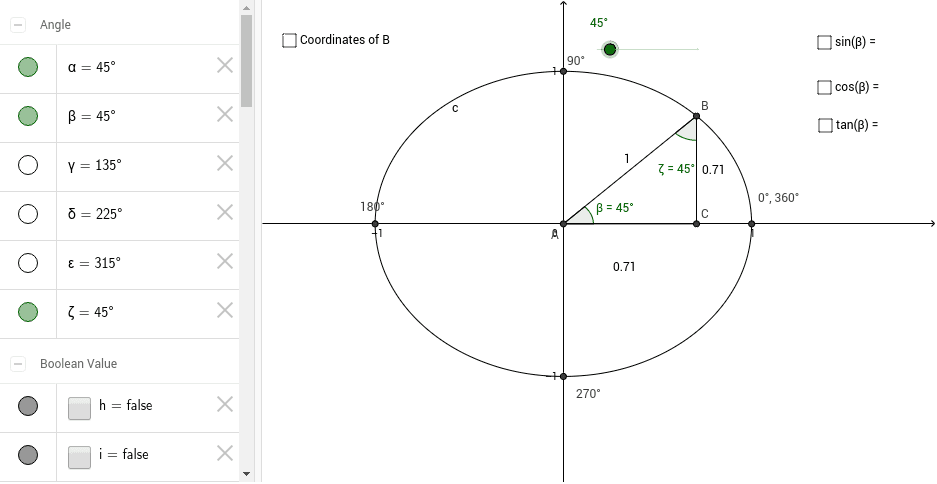
This example dynamically demonstrates the relationship between the unit circle and right triangle trigonometry, illustrating how sine, cosine, and tangent functions are defined geometrically. Key math concepts include the unit circle, trigonometric functions, right triangles, and angle measurement. The construction utilizes GeoGebra commands such as Intersect, Point, Circle, Rotate, Angle, OrthogonalLine, and Segment. It is suitable for high school mathematics students to understand the geometric definitions of trigonometric functions and the application of the unit circle, as well as for introductory calculus education.
GeoGebra Commands & Parameters
Intersect(xAxis, yAxis) → APoint(yAxis) → B_1Circle(A, B_1) → cIntersect(c, xAxis, 2.0) → DRotate(D, α, A) → BAngle(D, A, B) → βOrthogonalLine(B, xAxis) → aIntersect(a, xAxis) → CSegment(B, C) → bSegment(A, B) → dSegment(A, C) → eIntersect(c, xAxis, 1.0) → EAngle(B, A, E) → γIntersect(c, yAxis, 1.0) → FIntersect(c, yAxis, 2.0) → GAngle(E, A, B) → δAngle(B, A, D) → εAngle(A, B, C) → ζ
AI Drawing Prompt Reference
Draw a unit circle centered at the origin, with radius determined by a point on the y-axis. Place a point on the circle such that the radius to it forms an adjustable angle with the positive x-axis. Drop a perpendicular from this point to the x-axis, marking the foot. Connect the center, the circle point, and the foot to form a right triangle. Also mark the intersections of the circle with the x- and y-axes. Display several angle markers, including the central angle between the radius and the x-axis, and the angle at the circle point between the radius and the perpendicular, to illustrate the geometric definitions of sine, cosine, and tangent.
The prompt above was compiled from the original drawing commands and is for reference only.