
Exploring the Incenter and Incircle
Loading the math board and drawing, please wait…
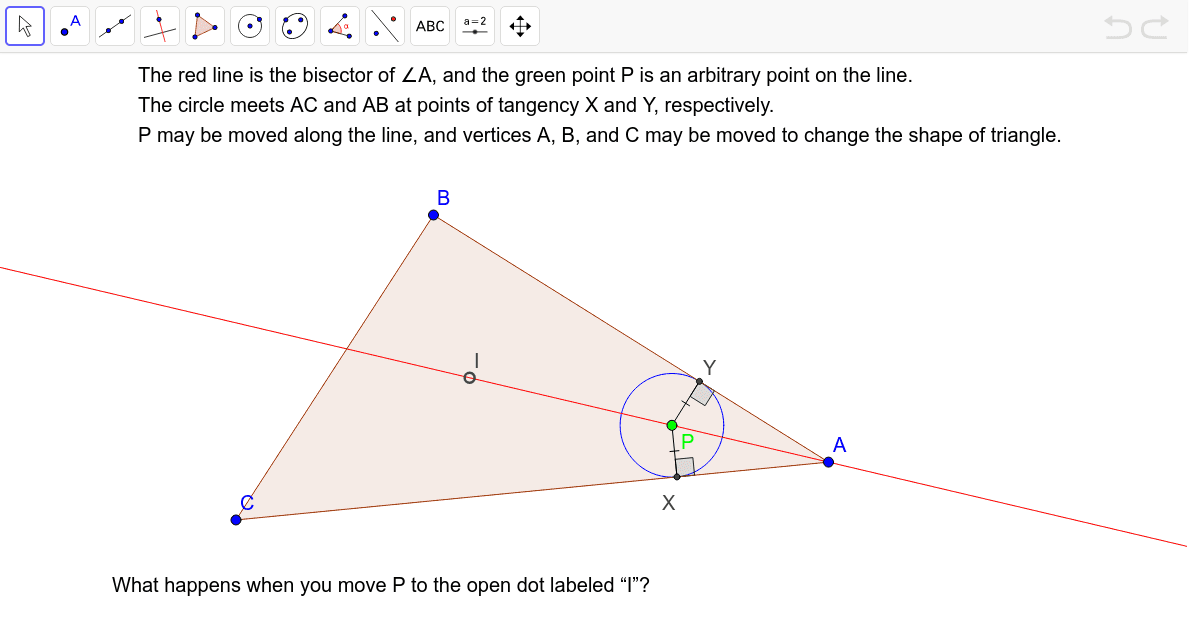
This example demonstrates how to construct the incenter of a triangle by intersecting the angle bisectors and then drawing the incircle. Key math concepts include angle bisectors, incenter, incircle, and triangle geometry. Construction involves commands like Polygon, AngularBisector, Point, Intersect, OrthogonalLine, Segment, Angle, and Circle. Suitable for high school students learning geometric constructions to understand the properties of the incenter and its relation to the incircle.
GeoGebra Commands & Parameters
Polygon(A, B, C) → poly1, c, a, bAngularBisector(B, A, C) → dPoint(d) → PAngularBisector(B, C, A) → eIntersect(d, e) → IOrthogonalLine(P, c) → fOrthogonalLine(P, b) → gIntersect(f, c) → YIntersect(g, b) → XSegment(P, Y) → hSegment(P, X) → iAngle(P, Y, A) → αAngle(A, X, P) → βCircle(P, Y) → k
AI Drawing Prompt Reference
Draw a triangle, find the intersection of two angle bisectors to locate the incenter, then draw perpendicular lines from the incenter to two sides of the triangle. The feet of these perpendiculars are the points where the incircle touches the sides. Finally, draw a circle centered at the incenter with a radius equal to the distance between the feet of the perpendiculars to get the incircle.
The prompt above was compiled from the original drawing commands and is for reference only.