
Exploring the Angle Addition Postulate with GeoGebra
Loading the math board and drawing, please wait…
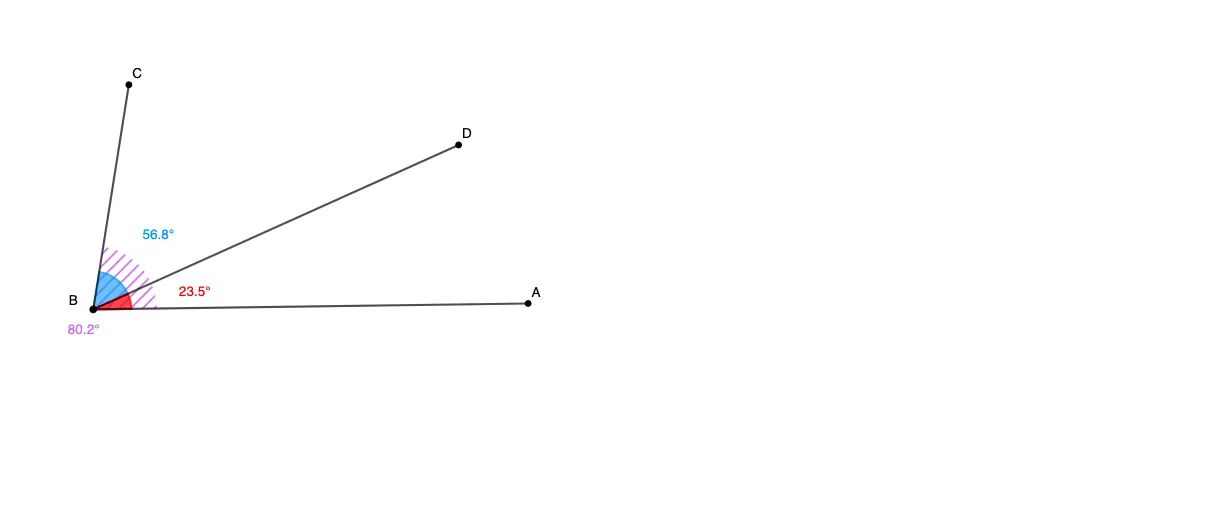
This example demonstrates the Angle Addition Postulate visually: it explores how a larger angle can be decomposed into the sum of two adjacent angles using a middle ray, and confirms the relationship through geometric construction and angle measurement. Key concepts include angle addition, adjacent angles, and the geometric interpretation of angle measures. Construction approach: based on the provided GeoGebra construction summary, the scene is built primarily with the GeoGebra commands “Segment” and “Angle”, using points (A, B, C, D, and related labeled objects) to create line segments and angle objects (α, β, γ). Additional labeled elements (f, g, h) act as auxiliary geometric components that support the decomposition and comparison of the constituent angles with the overall angle. Suitable for middle and high school geometry lessons on angle measure and reasoning, and for learners who want an interactive way to understand and verify the angle addition rule.
GeoGebra Commands & Parameters
Segment(A, B) → fSegment(B, C) → gAngle(A, B, C) → αSegment(B, D) → hAngle(D, B, C) → βAngle(A, B, D) → γ
AI Drawing Prompt Reference
Draw a triangle ABC, and from point B draw a line segment to point D to form two adjacent angles α and β. Then measure angle γ, which is the sum of angles α and β. Use segment f to connect points A and B, segment g to connect points B and C, and segment h to connect points B and D.
The prompt above was compiled from the original drawing commands and is for reference only.