
Exploring SSA Triangle Congruence
Loading the math board and drawing, please wait…
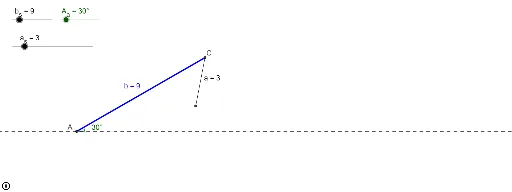
This example demonstrates the geometric phenomenon of triangle congruence under specific conditions (given two sides and the angle opposite one of them). Key math concepts include triangle congruence criteria (SSA), geometric construction, and angle measurement. It utilizes GeoGebra commands/objects like Circle, Intersect, Segment, Angle, If, and Polygon to construct and analyze the scenario, making it suitable for high school students and teachers to explore and verify geometric theorems and understand congruence judgments under complex conditions.
GeoGebra Commands & Parameters
Circle(C, a_s) → dIntersect(xAxis, yAxis) → ASegment(A - (100, 0), A + (100, 0)) → c_0Intersect(d, c_0) → B_1, B_2Angle(B_1, C, B_2) → βSegment(A, C) → bIf(a_s ≥ (b * sin(A_a)), β, 60°) → sweepSegment(C, B) → aSegment(C, B_1) → a_1Segment(C, B_2) → a_2Angle((1, 0), A, C) → αSegment(C, B_1) → a_3Segment(B_2, A) → cPolygon(A, C, B_1) → poly1, b_1, a_4, c_1Polygon(A, C, B_2) → poly2, b_2, a_5, c_2
AI Drawing Prompt Reference
Draw two triangles sharing two sides and an angle opposite one of them, showing the two possible constructions. Start with a horizontal segment, draw a circle centered at one endpoint with the other endpoint as radius, intersecting the horizontal line at two points. Connect the center to these points to form two triangles. Measure and display the angles opposite the known side in both triangles, comparing for congruence.
The prompt above was compiled from the original drawing commands and is for reference only.