
Exploring Right Triangles
Loading the math board and drawing, please wait…
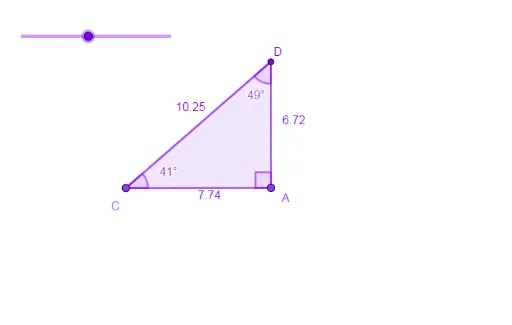
This example demonstrates the construction of right triangles using fundamental elements like rotations, angles, rays, and points, while exploring related properties. Core mathematical concepts include angle measurement, triangle angle sum, rotational symmetry, and geometric construction. Key GeoGebra commands used are Rotate, Angle, Ray, Point, Intersect, Polygon, and InteriorAngles. Suitable for middle school and above students to understand geometric constructions and properties of right triangles.
GeoGebra Commands & Parameters
Rotate(B, (-(90°)), A) → B'Angle(B', A, B) → αRay(A, B') → fRay(A, B) → gPoint(g) → CRotate(A, a, C) → A'Angle(A, C, A') → βRay(C, A') → hIntersect(h, f) → DPolygon(C, A, D) → t1, d, c, a_1InteriorAngles(t1) → γ, δ, ε
AI Drawing Prompt Reference
Draw a right triangle by rotating one leg 90 degrees counterclockwise around the right angle vertex to form the other leg, then connecting the two vertices to create the hypotenuse. Measure the angle between the legs, take a point on one leg, and rotate the other leg to this point to form another triangle. Finally, measure all interior angles to illustrate the geometric properties and rotational symmetry of the right triangle.
The prompt above was compiled from the original drawing commands and is for reference only.