
Exploring Regular Polygons: Construction, Naming, and Parameter Changes
Loading the math board and drawing, please wait…
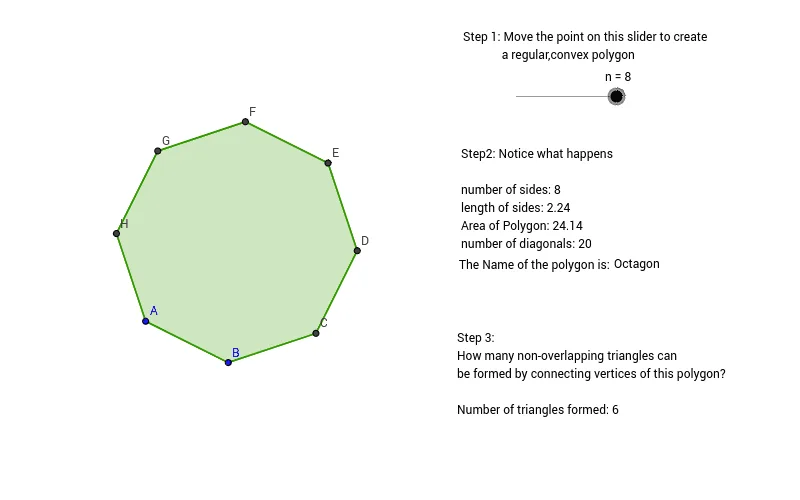
This GeoGebra applet lets students explore the basic properties of regular polygons and observe how the shape and related features change as the number of sides varies. It focuses on key ideas such as the definition of a regular polygon (controlled by the integer n), constructing vertices, connecting vertices to form the polygon, and using the side count to name/classify polygons (e.g., n=3 as a triangle). The construction is built with GeoGebra’s Polygon and Segment commands to generate and display the polygon from selected/constructed points (objects like n, A, B, and intermediate points such as C, D, E, F, G, H). Text objects (e.g., NameTriangle and several text labels) are used to present names/identifiers, while specific segments (e.g., AC and others) help visualize the defining connections. Suitable for middle school to early high school geometry lessons, classroom demonstrations, and guided investigations on polygon structure and naming.
GeoGebra Commands & Parameters
Polygon(A, B, n) → poly1, c, D, E, F, G, H, a, b, d, e, f, g, h, CSegment(A, C) → AC
AI Drawing Prompt Reference
Draw a regular polygon with a slider to control the number of sides, showing how the shape and angles change as the number of sides varies. Connect the vertices with line segments to form the polygon, label the number of sides, and display the polygon's name based on the number of sides (e.g., triangle for 3 sides). Use line segments to connect certain vertices to illustrate the construction process, and add text labels for the polygon's name and key points.
The prompt above was compiled from the original drawing commands and is for reference only.