
Exploring Reflections 1
Loading the math board and drawing, please wait…
In collections
Geometry Transformations
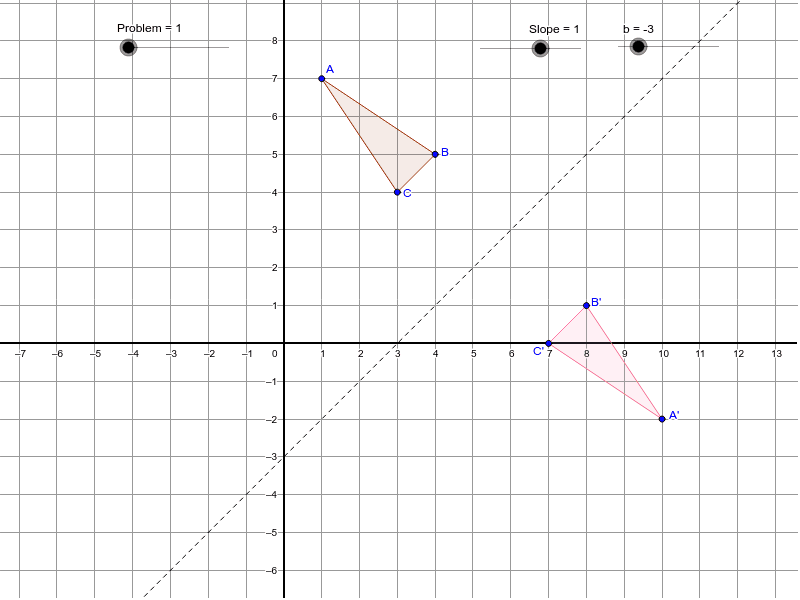
This example demonstrates reflections, involving concepts such as reflections, inequalities, congruence, coordinates, and complex numbers. Using GeoGebra commands like Polygon and Mirror, you can construct reflection figures. Suitable for middle school and above students or teachers.
GeoGebra Commands & Parameters
Polygon(A, B, C) → poly1, c, a, b_1Mirror(A, d) → A'Mirror(B, d) → B'Mirror(C, d) → C'Polygon(A', B', C') → poly1', c', a', b'Mirror(A, e) → A'_2Mirror(B, e) → B'_2Mirror(C, e) → C'_2Polygon(A'_2, B'_2, C'_2) → poly1'_1, c'_1, a'_1, b'_1Mirror(A, f) → A'_3Mirror(B, f) → B'_3Mirror(C, f) → C'_3Polygon(A'_3, B'_3, C'_3) → poly1'_2, c'_2, a'_2, b'_2Mirror(A, g) → A'_4Mirror(B, g) → B'_4Mirror(C, g) → C'_4Polygon(A'_4, B'_4, C'_4) → poly1'_3, c'_3, a'_3, b'_3
AI Drawing Prompt Reference
Draw a triangle ABC, then reflect it over lines d, e, f, and g to create four new triangles A'B'C', A'_2B'_2C'_2, A'_3B'_3C'_3, and A'_4B'_4C'_4. Start by drawing triangle ABC, then reflect it over each line in sequence to observe the positions of the new triangles.
The prompt above was compiled from the original drawing commands and is for reference only.