
Exploring Mixed Numbers - 2: Visualizing Fractions with GeoGebra
Loading the math board and drawing, please wait…
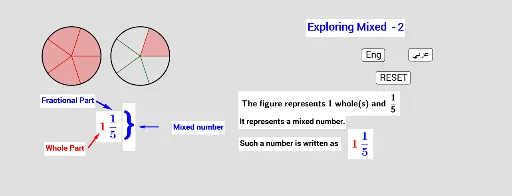
① This GeoGebra example dynamically demonstrates mixed numbers (also called mixed fractions) through geometric representations, using circles, points, vectors, and sequences to visually separate the whole-number part from the proper fraction part, making the concept tangible for learners. ② Core mathematical concepts include the definition of mixed numbers, the combination of integers and fractions, fraction representation on number lines or area models, and operations such as subtraction, along with elements of geometric distribution and random generation. ③ Construction highlights: Based on the construction summary, the example employs commands such as Circle, Point, Random, Append, Sequence, and Vector, creating multiple points (A through L), circles (c1-c4), segments (a, b, u, v), numerous lists (list1 to list12), and text objects (text4, text11, etc.), with buttons (Arab, Eng, button1, button2) for switching between Arabic and English interfaces. ④ This resource is suitable for upper-elementary to middle-school students learning fractions and mixed numbers, as well as for mathematics teachers creating interactive lessons to deepen understanding through visual and hands-on exploration.
GeoGebra Commands & Parameters
Circle(A, 3) → c1Circle(B, 3) → c2Circle(C, 3) → c3Circle(D, 3) → c4Point(c1) → ERandom(5, 9) → aPoint(c2) → FPoint(c3) → GRandom(2, 5) → bPoint(c4) → HAppend(E, Sequence[Rotate[E, ((k * 360 / b))°, A], k, 1, b]) → list1Sequence(CircleSector[A, Element[list1, k], Element[list1, k + 1]], k, 1, b) → list5Append(F, Sequence[Rotate[F, ((k * 360 / b))°, B], k, 1, b]) → list2Append(G, Sequence[Rotate[G, ((k * 360 / b))°, C], k, 1, b]) → list3Append(H, Sequence[Rotate[H, ((k * 360 / b))°, D], k, 1, b]) → list4Sequence(CircleSector[B, Element[list2, k], Element[list2, k + 1]], k, 1, b) → list6Sequence(CircleSector[C, Element[list3, k], Element[list3, k + 1]], k, 1, b) → list7Sequence(CircleSector[D, Element[list4, k], Element[list4, k + 1]], k, 1, b) → list8Sequence(CircleSector[A, Element[list1, k], Element[list1, k + 1]], k, 1, a) → list9Sequence(CircleSector[B, Element[list2, k], Element[list2, k + 1]], k, 1, a - b) → list10Sequence(CircleSector[C, Element[list3, k], Element[list3, k + 1]], k, 1, a - (2 * b)) → list11Sequence(CircleSector[D, Element[list4, k], Element[list4, k + 1]], k, 1, a - (3 * b)) → list12Vector(I, J) → uVector(K, L) → vVector(M, N) → wRandom(5, 9) → a_1Random(2, 5) → b_1