
Exploring Angles in Quadrilaterals via Rotation and Intersections
Loading the math board and drawing, please wait…
In collections
Angles
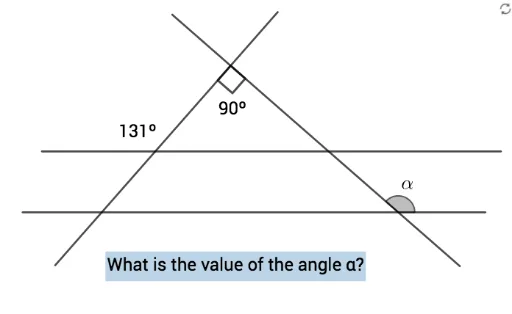
① This example demonstrates angle relationships within a quadrilateral by rotating a point, constructing intersecting lines, and forming polygons, with dynamic text labels showing angle measures. ② Core math concepts include angle measurement, rotation, quadrilateral interior angles, vertical and supplementary angles from intersecting lines, and the use of linear functions for auxiliary constructions. ③ Construction highlights: using GeoGebra commands Rotate to create A' from A, Angle to mark α, β, γ, Line, Segment, and Intersect to build auxiliary lines f, g, h and points C, D, E, etc., Polygon to form the quadrilateral, and text objects texto1, texto2, texto3 to display angle values. ④ Suitable for middle school geometry lessons, this interactive tool helps students explore quadrilateral angle properties, rotational symmetry, and angle calculations, serving as a dynamic visual aid for understanding angle relationships in intersecting lines.
GeoGebra Commands & Parameters
Rotate(A, 90°, B) → A'Angle(A, B, A') → αLine(B, A) → fLine(B, A') → gLine(A, xAxis) → hPoint(f) → CLine(C, h) → iPoint(f) → DPoint(f) → ESegment(D, E) → jPoint(g) → FPoint(g) → GSegment(F, G) → kPoint(i) → HPoint(i) → ISegment(H, I) → lPoint(h) → JPoint(h) → KSegment(J, K) → mPoint(m) → LIntersect(j, m) → MPoint(j) → NPolygon(L, M, N) → t1, n, l_1, m_1Angle(N, M, L) → βPoint(k) → OIntersect(k, l) → PPoint(l) → QPolygon(O, P, Q) → t2, q, o, pAngle(Q, P, O) → γ
AI Drawing Prompt Reference
Draw a quadrilateral to explore angle relationships by rotating a point and constructing intersecting lines. Rotate a point to create a new position, then mark the angles before and after rotation. Draw several auxiliary lines and find their intersection points. Use these points and line segments to form two smaller polygons, labeling the measures of three key angles to demonstrate the interior angles of the quadrilateral and the relationships formed by intersecting lines.
The prompt above was compiled from the original drawing commands and is for reference only.