
Explore Slopes and Equations of Linear Functions
Loading the math board and drawing, please wait…
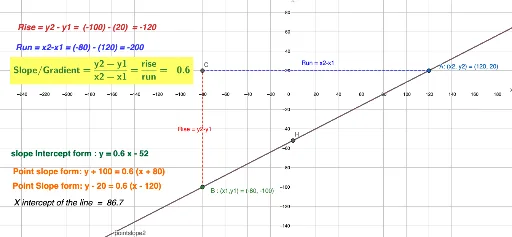
This example demonstrates how to explore slopes and equations of linear functions using GeoGebra. Key math concepts include slope, linear equations (point-slope form, slope-intercept form), and analytical geometry. Construction highlights the use of commands/objects like Line, OrthogonalLine, Intersect, Segment, and Distance. Suitable for middle school and above students learning properties and applications of linear functions.
GeoGebra Commands & Parameters
Line(A, B) → fOrthogonalLine(B, xAxis) → gOrthogonalLine(A, yAxis) → hIntersect(g, h) → CSegment(B, C) → iSegment(C, A) → jDistance(C, B) → distanceCBDistance(C, j) → distanceCjDistance(C, A) → distanceCAIntersect(f, yAxis) → DIntersect(f, p) → EIntersect(xAxis, f) → FIntersect(f, p) → GIntersect(yAxis, f) → HIntersect(yAxis, f) → IIntersect(f, p) → JIntersect(f, p) → KIntersect(xAxis, f) → L
AI Drawing Prompt Reference
Draw a straight line passing through two given points, and mark its intersections with the coordinate axes. From one point, draw a perpendicular to the x-axis, and from the other point, draw a perpendicular to the y-axis; these two perpendiculars meet at a point, which is connected to the two original points by segments, forming a right triangle. Measure and display the distances from this intersection point to each of the two original points and to one of the perpendicular segments. Additionally, place marked points at multiple intersections of the line with the axes and with a horizontal auxiliary line, to illustrate the geometric meaning of slope and intercept in the line's equation.
The prompt above was compiled from the original drawing commands and is for reference only.