
Example: Finding Median Lines in Coordinate Geometry
Loading the math board and drawing, please wait…
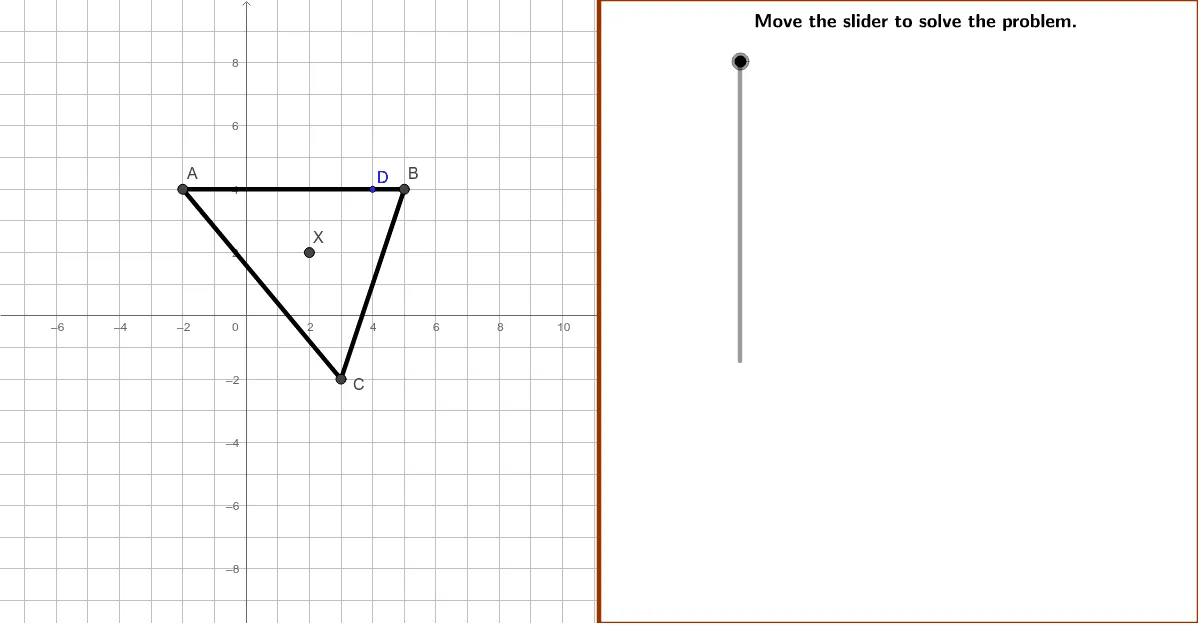
This example demonstrates how to find the equations of the median lines of a triangle in coordinate geometry. Using triangle ABC with vertices A(–2, 4), B(5, 4), and C(3, –2), the task is to calculate the midpoints of each side and derive the line equations using the two-point form. Key GeoGebra commands used include Polygon, Line, Segment, Midpoint, Intersect, Slope, and TableText for displaying results. Suitable for high school coordinate geometry instruction, helping students grasp the properties of median lines and equation-solving techniques.
GeoGebra Commands & Parameters
Polygon((instructionEdge, y(Corner[1])), Corner[2], Corner[3], (instructionEdge, y(Corner[4]))) → instruction, instructionBottom, instructionRight, instructionTop, instructionLeftLine((instructionEdge + ((4 * indent) * screenwidth), 0), yAxis) → align3Line((instructionEdge + ((3 * indent) * screenwidth), 0), yAxis) → align2Line((instructionEdge + ((2 * indent) * screenwidth), 0), yAxis) → align1Segment(A, B) → aSegment(B, C) → bSegment(C, A) → cMidpoint(a) → TMidpoint(c) → VMidpoint(b) → ULine(T, C) → eLine(U, A) → fIntersect(f, e) → XLine(V, B) → dSlope(f) → slopeAUSlope(d) → slopeBVSlope(e) → slopeCTLine(A_{fix}, B_{fix}) → gTableText({{"\leftrightarrow"}, {"\mathit{AU}"}}, "c") → text1TableText({{(("\left(\mathit{y}-\left(" * yA) * "\right)\right)"), "=", (((slopeAU * "\left(\mathit{x}-\left(") * xA) * "\right)\right)")}, {(((("\left(\left(" * yX) * "\right)-\left(") * yA) * "\right)\right)"), "=", (((((slopeAU * "\left(\left(") * xX) * "\right)-\left(") * xA) * "\right)\right)")}, {AUleft, "=", (AUright * "\quad\quad\checkmark")}}, "rcl") → text2TableText({{(("\left(\mathit{y}-\left(" * yB) * "\right)\right)"), "=", (((slopeBV * "\left(\mathit{x}-\left(") * xB) * "\right)\right)")}, {(((("\left(\left(" * yX) * "\right)-\left(") * yB) * "\right)\right)"), "=", (((((slopeBV * "\left(\left(") * xX) * "\right)-\left(") * xB) * "\right)\right)")}, {BVleft, "=", (BVright * "\quad\quad\checkmark")}}, "rcl") → text40TableText({{(("\left(\mathit{y}-\left(" * yC) * "\right)\right)"), "=", (((slopeCT * "\left(\mathit{x}-\left(") * yC) * "\right)\right)")}, {(((("\left(\left(" * yX) * "\right)-\left(") * yC) * "\right)\right)"), "=", (((((runCT * "\left(\left(") * xX) * "\right)-\left(") * xC) * "\right)\right)")}, {CTleft, "=", (CTright * "\quad\quad\checkmark")}}, "rcl") → text41
AI Drawing Prompt Reference
Draw a triangle with vertices at (-2, 4), (5, 4), and (3, -2). Mark the midpoints of each side and draw lines from each vertex to the opposite midpoint to represent the median lines of the triangle. Label the equations of each median line using the two-point form and display the calculations.
The prompt above was compiled from the original drawing commands and is for reference only.