
Equivalent Fractions on Number Line
Loading the math board and drawing, please wait…
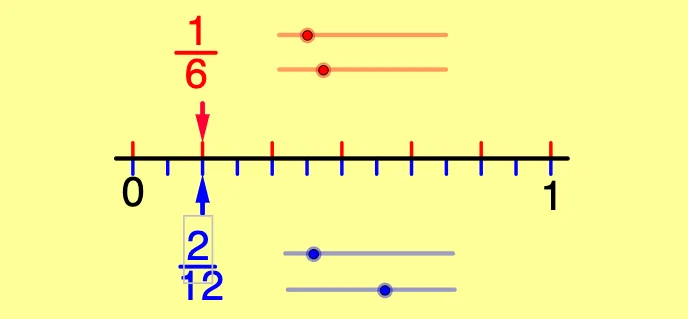
This example visually demonstrates the concept of equivalent fractions on a number line, helping students grasp their relative positions and comparisons. It involves core math concepts like equivalent fractions, number line representation, and fraction comparison. Constructed using GeoGebra commands such as Sequence, Segment, Element, and Vector, it is suitable for middle school mathematics education to reinforce understanding of the geometric meaning and representation of equivalent fractions on a number line.
GeoGebra Commands & Parameters
Sequence((x(A) + (i * l / d1), y(A)), i, 0, d1) → top1Sequence((x(A) + (i * l / d1), y(A) - yb), i, 0, d1) → bot1Sequence(Segment[Element[bot1, j], Element[top1, j]], j, 1, d1 + 1) → seg1Segment(C, D) → aSequence((x(A) + (i * l / d2), y(A) + yb), i, 0, d2) → top2Sequence((x(A) + (i * l / d2), y(A)), i, 0, d2) → bot2Sequence(Segment[Element[bot2, j], Element[top2, j]], j, 1, d2 + 1) → seg2Segment(E, F) → bSegment(G, H) → cElement(bot1, n1 + 1) → SElement(top2, n2 + 1) → QVector(R, Q) → uVector(T, S) → v
AI Drawing Prompt Reference
Draw a number line with two sets of equally spaced tick marks dividing the unit interval into different numbers of parts. Create two horizontal rows of vertical segments, one above and one below the line, with corresponding ticks connected by vertical lines. Add two horizontal reference segments. Select one tick from each set and connect them with an arrow vector to show they represent the same fraction value. The diagram illustrates equivalent fractions at different positions on the number line.
The prompt above was compiled from the original drawing commands and is for reference only.