
Equivalent Fractions by Ibrahim El Hage
Loading the math board and drawing, please wait…
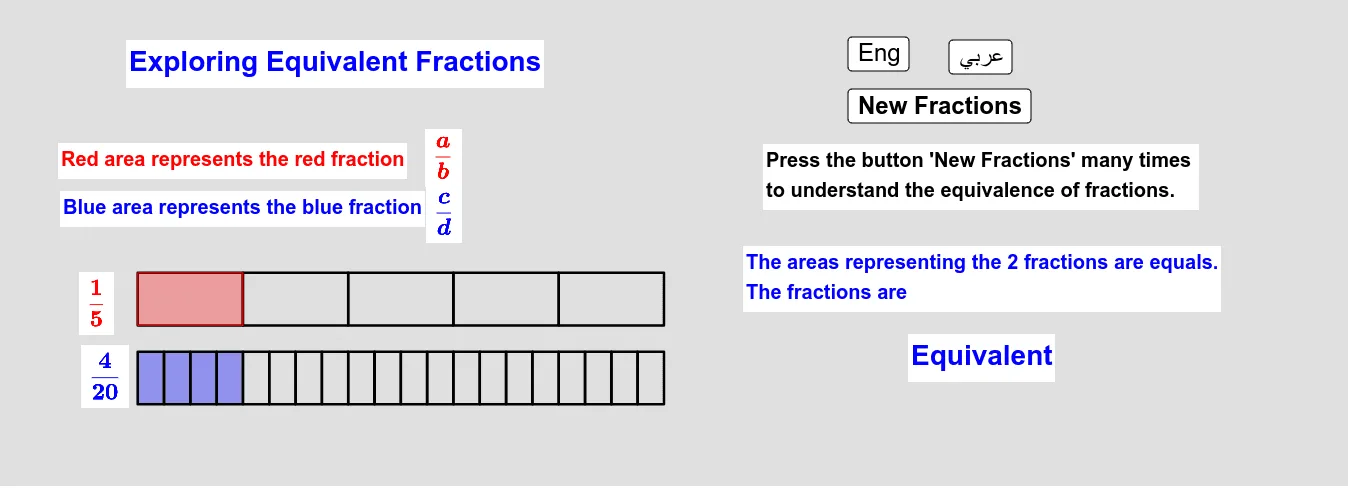
This example demonstrates the concept of equivalent fractions. By using multiplication, it generates different forms that are equivalent to the given fraction. Commands like Random, If, and Sequence are used, suitable for high-grade elementary or junior high school students to learn the basic properties of fractions.
GeoGebra Commands & Parameters
Random(2, 10) → bRandom(0, 1) → eRandom(1, b - 1) → aRandom(2, 4) → mIf(e ≟ 0, (a * m), a) → cSequence(Rectangle[20 / d, ((k * 20 / d), -1), ((k * 20 / d), -3)], k, 0, d - 1) → list5Sequence(Rectangle[20 / b, ((k * 20 / b), 2), ((k * 20 / b), 0)], k, 0, b - 1) → list1Sequence(Rectangle[20 / b, ((k * 20 / b), 2), ((k * 20 / b), 0)], k, 0, a - 1) → list2Sequence(Rectangle[20 / d, ((k * 20 / d), -1), ((k * 20 / d), -3)], k, 0, c - 1) → list3
AI Drawing Prompt Reference
Create a geometric illustration to demonstrate the concept of equivalent fractions by generating different forms that are equivalent to a given fraction. Start by randomly selecting two numbers, one for a set of smaller rectangles and another for a set of larger rectangles. Adjust the number of smaller rectangles based on a condition. Then, use sequence commands to draw the two sets of rectangles, representing the numerator and denominator respectively, arranged to visually show the equivalence of fractions.
The prompt above was compiled from the original drawing commands and is for reference only.