
Ellipse - M241 Worksheet
Loading the math board and drawing, please wait…
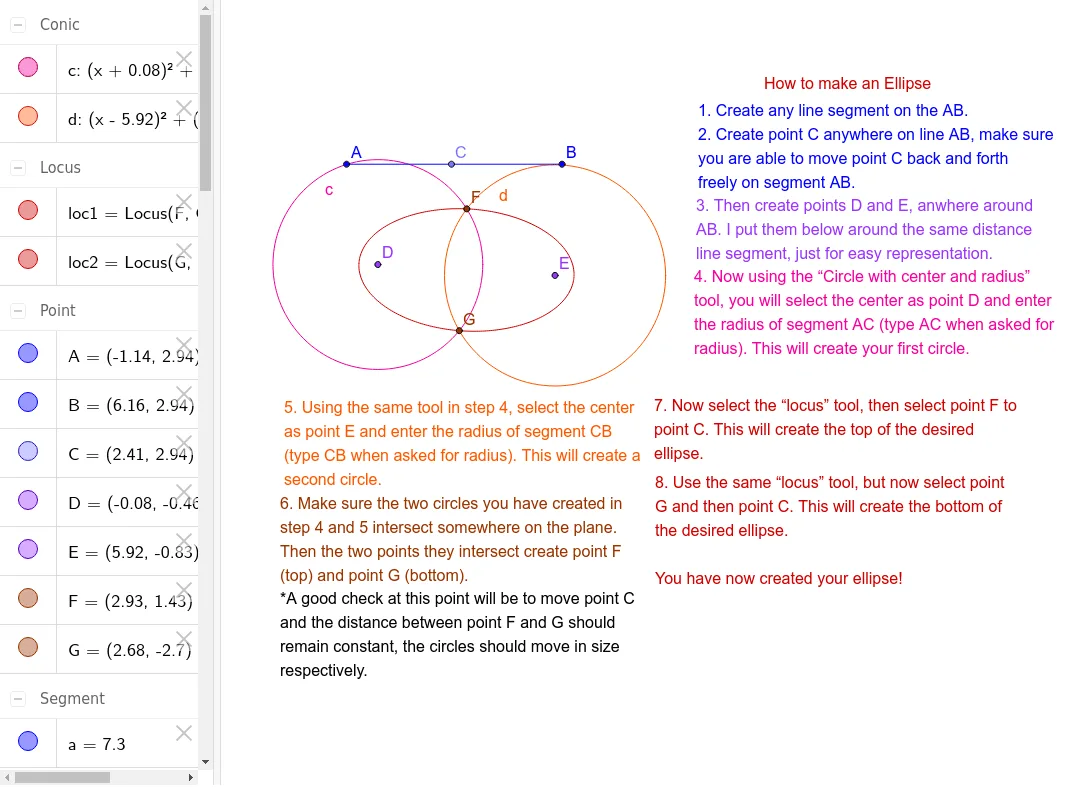
① This GeoGebra example demonstrates the construction and generation of an ellipse through the locus of a moving point, illustrating the classic definition where the sum of distances to two fixed foci is constant. ② Core mathematical concepts include the definition of an ellipse, the locus (trajectory) approach, and the geometric properties of conic sections. ③ Construction details: using GeoGebra commands such as Segment (to create a fixed-length segment), Point (to mark foci and moving points), Circle (for auxiliary construction), Intersect (to find key intersection points), and Locus (to generate the ellipse curve); objects include points A, B, C, D, E, F, G, segments a, c, d, circle c, loci loc1 and loc2, and multiple text labels. ④ Suitable for high school analytic geometry or pre-calculus courses, ideal for teachers demonstrating ellipse construction or students exploring the locus definition interactively.
GeoGebra Commands & Parameters
Segment(A, B) → aPoint(a) → CCircle(E, Distance[C, B]) → dCircle(D, Distance[A, C]) → cIntersect(d, c, 2) → FIntersect(d, c, 1) → GLocus(F, C) → loc1Locus(G, C) → loc2
AI Drawing Prompt Reference
Draw an ellipse with two foci, where the sum of distances from any point on the ellipse to the foci is constant. Include auxiliary line segments and circles to help understand the definition. The construction order starts with the foci, then auxiliary circles, finding intersection points, and finally generating the ellipse curve from these points.
The prompt above was compiled from the original drawing commands and is for reference only.