
Ellipse Center Form Demo
Loading the math board and drawing, please wait…
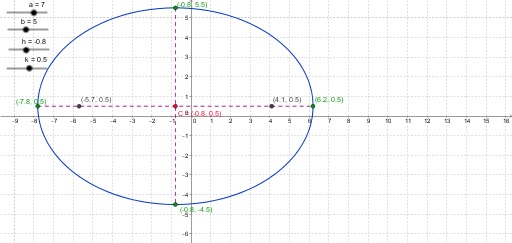
This example demonstrates the center form of an ellipse and its geometric properties. It involves core math concepts like the standard and parametric equations of an ellipse, point-line relationships in analytical geometry. Construction highlights include using GeoGebra commands such as Line, Intersect, Segment, and Circle. Suitable for high school and above learners to understand the geometric construction and properties of ellipses.
GeoGebra Commands & Parameters
Line(C, xAxis) → dIntersect(c, d) → A, BLine(C, yAxis) → eIntersect(c, e) → D, ESegment(A, B) → fSegment(E, D) → gCircle(E, 5) → pCircle(E, a) → qIntersect(q, f) → F, GCircle(B, b) → rIntersect(r, g) → H, I
AI Drawing Prompt Reference
Draw an ellipse centered at the origin with its major axis horizontal and minor axis vertical. From the center, draw two lines along the horizontal and vertical axes, intersecting the ellipse at four vertices. Connect the left and right vertices with a horizontal segment, and the top and bottom vertices with a vertical segment. Using the top vertex as center, draw a circle of radius 5, and another circle of radius equal to the ellipse's semi-major axis; this second circle intersects the horizontal segment at two points. Then, using the right vertex as center, draw a circle of radius equal to the semi-minor axis, which intersects the vertical segment at two points. The final figure shows the ellipse, its axes, vertex segments, and the intersection points of the auxiliary circles with those segments.
The prompt above was compiled from the original drawing commands and is for reference only.