
Ellipse and Hyperbola Interactive Demo by Daniel Schaben
Loading the math board and drawing, please wait…
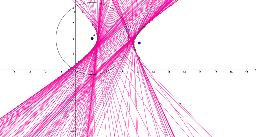
This example demonstrates the geometric properties and equation relationships of ellipses and hyperbolas interactively. It involves core math concepts like definitions, equations, dilation, and coordinate geometry. Construction highlights include GeoGebra commands: Circle, Point, LineBisector, Line, Intersect. Suitable for high school and above learners to understand conic sections and dynamic geometric transformations.
GeoGebra Commands & Parameters
Circle(A, B) → cPoint(c) → DLineBisector(C, D) → aLine(D, A) → bIntersect(a, b) → E
AI Drawing Prompt Reference
Create an interactive demo of an ellipse and hyperbola. Start with two fixed points as foci. Draw a circle centered at one focus, and pick a point on the circle. Connect this point to the other focus and construct the perpendicular bisector of that segment. Also draw a line from the point to the first focus. The intersection of the bisector and this line traces a curve. As you drag the point on the circle, the intersection moves, forming either an ellipse or a hyperbola, demonstrating their geometric definitions and equation relationships.
The prompt above was compiled from the original drawing commands and is for reference only.