
Effects of Changes on the Area of a Parallelogram
Loading the math board and drawing, please wait…
In collections
Parallelogramm und Raute: Flächeninhalt
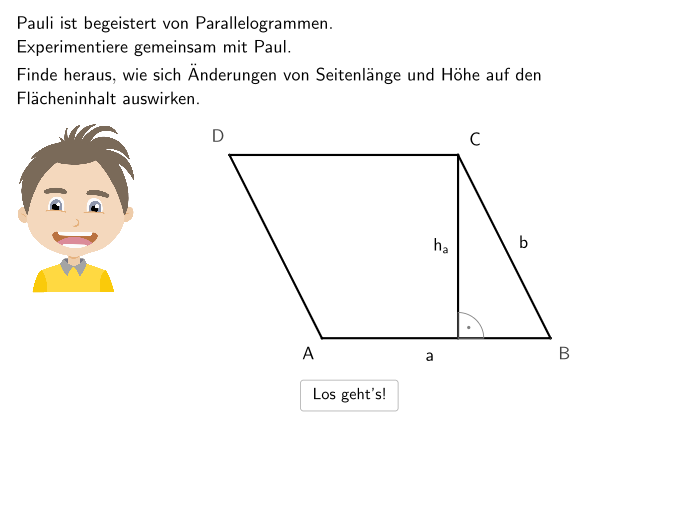
This example demonstrates how the area of a parallelogram changes with modifications to its side lengths and height. Key math concepts include the area formula (base×height) and proportional relationships. GeoGebra commands like Textfield, SpeechBubbleLeft, Sequence, Point, Element, SelectedIndex, If, Segment, Text, Mirror, and Angle are used in its construction. It is suitable for 5-6 grade students to understand and apply the area formula for parallelograms.
GeoGebra Commands & Parameters
Textfield(input1) → InputBox1Textfield(input2) → InputBox2Textfield(input3) → InputBox3Textfield(input4) → InputBox4SpeechBubbleLeft(E, 10.5, 2) → Vieleck1Sequence(F + (i * Vector[F, H] / 2), i, -2, 10) → HorizontalPunktePoint(Para1Kanten) → OPoint(Para2Kanten) → PElement(MatrixSol, schiebh + 1, schieba + 1) → ddsolSelectedIndex(DD) → index1SelectedIndex(DD00) → index00SelectedIndex(DD01) → index01SelectedIndex(DD02) → index02SelectedIndex(DD03) → index03SelectedIndex(DD10) → index10SelectedIndex(DD12) → index12SelectedIndex(DD20) → index20SelectedIndex(DD22) → index22SelectedIndex(DD30) → index30SelectedIndex(DD32) → index32SelectedIndex(DD33) → index33SelectedIndex(DD13) → index13SelectedIndex(DD11) → index11SelectedIndex(DD23) → index23SelectedIndex(DD31) → index31SelectedIndex(DD21) → index21If(mode00, index00, mode11, index11, mode12, index12, mode13, index13, mode20, index20, mode21, index21, mode01, mode22, index22, mode23, index23, mode30, index30, mode31, index31, mode32, index32, index01, mode33, index33, mode02, index02, mode03, index03, mode10, index10) → indexmasterSpeechBubbleLeft(Q, 11.5, 1.6) → Vieleck2Segment(K, L) → hSegment(L, HelperP) → iText(Text5, Midpoint[K, L] - (0, 0.2), false, true, 0, 0) → Text6Mirror(S, R) → S'Mirror(R, V) → R'Sequence(F - Vector[F, H] + (i * Vector[V, O]), i, 0, 4) → VertikalPunkteSequence(Segment[HorizontalPunkte(i), HorizontalPunkte(i) + Vector[VertikalPunkte(1), Element[Last[VertikalPunkte], 1]]], i, 1, Length[HorizontalPunkte]) → CoordSysYSequence(Segment[VertikalPunkte(i), VertikalPunkte(i) + Vector[HorizontalPunkte(1), Element[Last[HorizontalPunkte], 1]]], i, 1, Length[VertikalPunkte]) → CoordSysXIf(step < 8, 2, 3) → maxschiebSegment(G, (x(G), y(H))) → fSegment(M, (x(M), y(K))) → gSpeechBubbleLeft(W, 10, 1) → Vieleck3Angle(ParaStart2, I, ParaStart3) → αAngle(F + (10, 0), (x(G), y(H)), G) → γAngle(K + (10, 0), (x(M), y(K)), M) → βIf(mode00, "DD00", mode11, "DD11", mode12, "DD12", mode13, "DD13", mode20, "DD20", mode21, "DD21", mode01, mode22, "DD22", mode23, "DD23", mode30, "DD30", mode31, "DD31", mode32, "DD32", "DD01", mode33, "DD33", mode02, "DD02", mode03, "DD03", mode10, "DD10") → Text14
AI Drawing Prompt Reference
Draw a parallelogram on a coordinate plane and place three input boxes to control key geometric parameters, with a speech-bubble label for the figure. Construct its four vertices by linking a base side and the corresponding translated side so the shape updates with the inputs. Add a base-and-height style reference: draw segments that indicate the relationship between a chosen base edge and the height direction. Include angle markers to show the orientation between the parallelogram’s sides and the baseline direction, labeled α, β, and γ. Add text labels near the relevant points to clarify the diagram and keep the layout readable.
The prompt above was compiled from the original drawing commands and is for reference only.