
EC 1718 F6 Intersections
Loading the math board and drawing, please wait…
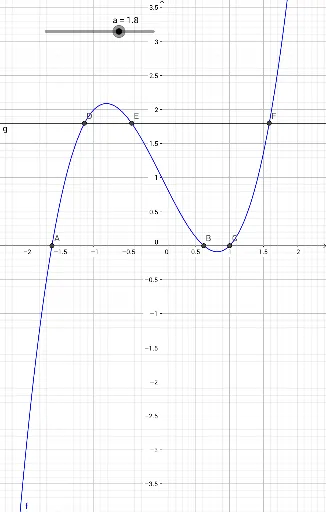
This example demonstrates how to use GeoGebra to draw and analyze intersections. Key mathematical concepts include functions, intersections, and geometric construction. By using the Root and Intersect commands, the intersection points between function f and line a are found. Suitable for high school mathematics education and learning.
GeoGebra Commands & Parameters
Root(f) → A, B, CIntersect(f, g) → D, E, F
AI Drawing Prompt Reference
Draw a Cartesian coordinate plane. Plot a cubic function curve and a straight line. The curve intersects the x-axis at three points, and the line intersects the curve at three points. Mark all these intersection points clearly with dots or crosses. The graph should be clean and focused on the intersections, showing the geometric relationship between the curve and the line.
The prompt above was compiled from the original drawing commands and is for reference only.