
Dynamic Square Graph
Loading the math board and drawing, please wait…
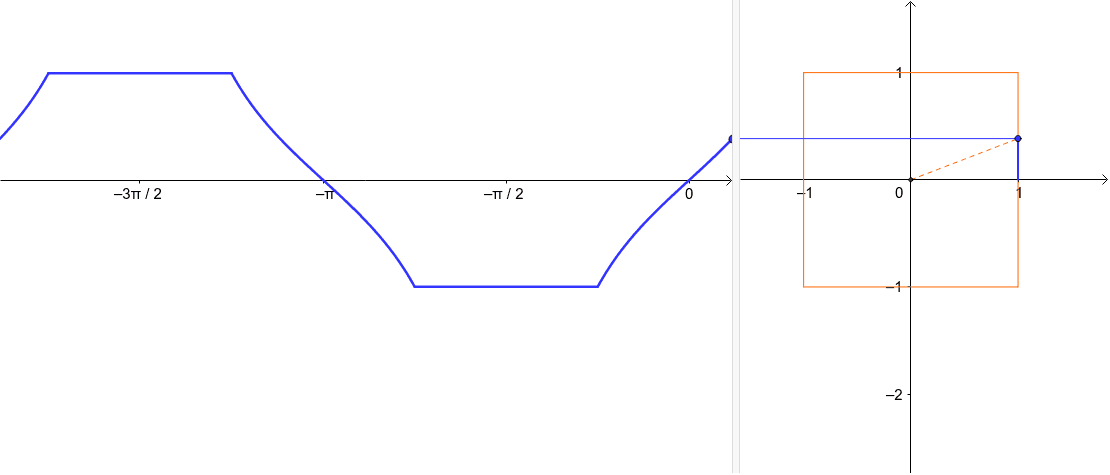
This example demonstrates the dynamic behavior of a square graph and its intersection with function curves. Key math concepts include function graphing, square construction, intersection calculation, optimization problems, and applications of rational and complex numbers. The construction utilizes GeoGebra commands like Intersect, Ray, Polygon, If, and Segment, as outlined in the summary. Suitable for high school and above, it helps learners understand the dynamic interaction between function graphs and geometric shapes, as well as optimization problems.
GeoGebra Commands & Parameters
Intersect(xAxis, yAxis) → CRay(C, A) → dPolygon((-1, -1), (1, -1), (1, 1), (-1, 1)) → poly1, f, g, h, iIntersect(d, poly1) → KIf((t ≥ π / 4) ∧ (t ≤ (3 * π / 4)), 2, If[(t > (3 * π / 4)) ∧ (t < (5 * π / 4)), 3, If[(t > (5 * π / 4)) ∧ (t < (7 * π / 4)), 4, 1]]) → pselectionSegment(C, K) → bIntersect(b, d) → EIntersect(i, b) → FIntersect(f, b) → LRay(K, (-2, y(K))) → aSegment(K, (x(K), 0)) → c
AI Drawing Prompt Reference
Draw a dynamic square and make it intersect with function curves. Start by marking the intersection point C on the coordinate axes, then draw a ray d from point C. Next, draw a square poly1 with side length 2, and find the intersection point K of ray d with the square. Use an if statement to define pselection based on the position of point K. Then, draw a line segment b from C to K, and find the intersections E, F, and L of b with d and i. Finally, draw a ray a from K and a line segment c from K to the x-axis.
The prompt above was compiled from the original drawing commands and is for reference only.