
Dynamic Ferris Wheel & Cart: Guess and Test
Loading the math board and drawing, please wait…
In collections
Math Year 4 Unit 1
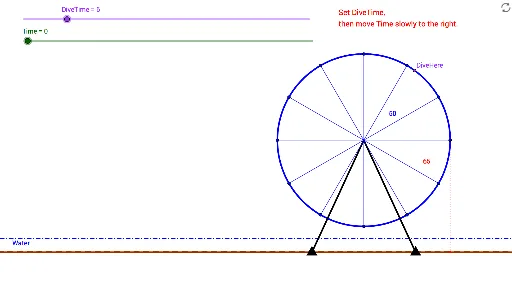
① This GeoGebra example dynamically demonstrates a rotating Ferris wheel with a hanging cart, allowing users to drag sliders or guess the cart's position and verify geometric relationships in real time. ② Core mathematical concepts include parametric equations of circles, rotation (Rotate), angles (Angle), lines and perpendiculars (Line, OrthogonalLine), intersections (Intersect), and distance measurement (Distance), along with vector and function ideas. ③ Construction highlights: Circle creates the wheel, Segment connects the center to the cart, Rotate and Angle control rotation, OrthogonalLine and Intersect generate auxiliary lines and zero markers, and Distance measures key lengths; objects include Time, Grd, C, c, G1, G2, etc., with slider Time driving the dynamic motion. ④ Suitable for middle and high school geometry and function lessons, especially for understanding rotational motion, parametric representation, and dynamic verification, as well as for inquiry-based learning or math lab activities.
GeoGebra Commands & Parameters
Circle(C, 50) → cSegment(C, G1) → aSegment(C, G2) → bRotate(Zero, α, C) → Zero'Angle(Zero, C, Zero') → βSegment(C, Zero') → dRotate(Zero, 30° + α, C) → Zero'_1Angle(Zero, C, Zero'_1) → γSegment(C, Zero'_1) → eRotate(Zero, 60° + α, C) → Zero'_2Angle(Zero, C, Zero'_2) → δSegment(C, Zero'_2) → fRotate(Zero, 90° + α, C) → Zero'_3Angle(Zero, C, Zero'_3) → εSegment(Zero'_3, C) → gRotate(Zero, 120° + α, C) → Zero'_4Angle(Zero, C, Zero'_4) → ζSegment(Zero'_4, C) → hRotate(Zero, 150° + α, C) → Zero'_5Angle(Zero, C, Zero'_5) → ηSegment(Zero'_5, C) → iRotate(Zero, 180° + α, C) → Zero'_6Angle(Zero, C, Zero'_6) → θSegment(Zero'_6, C) → jRotate(Zero, 210° + α, C) → Zero'_7Angle(Zero, C, Zero'_7) → ιSegment(Zero'_7, C) → kRotate(Zero, 240° + α, C) → Zero'_8Angle(Zero, C, Zero'_8) → κSegment(Zero'_8, C) → lRotate(Zero, 270° + α, C) → Zero'_9Angle(Zero, C, Zero'_9) → λSegment(Zero'_9, C) → mRotate(Zero, 300° + α, C) → Zero'_{10}Angle(Zero, C, Zero'_{10}) → μSegment(Zero'_{10}, C) → nRotate(Zero, 330° + α, C) → Zero'_{11}Angle(Zero, C, Zero'_{11}) → νSegment(Zero'_{11}, C) → pLine(G1, G2) → qOrthogonalLine(Zero', q) → rIntersect(r, q) → ASegment(Zero', A) → sOrthogonalLine(Zero'_1, d) → tIntersect(d, t) → BOrthogonalLine(Zero'_2, d) → b_1Intersect(b_1, d) → DDistance(D, C) → distanceDCIntersect(f_1, g_1, (12.282854594082735, -17.547711629319735)) → E
AI Drawing Prompt Reference
Draw a dynamic Ferris wheel with a cart hanging from the wheel's circumference. Use a slider to control the wheel's rotation angle, displaying the angle value. Draw line segments from the wheel's center to the cart. As the wheel rotates, mark points on the circumference at fixed angles (30°, 60°, 90°, etc.) and connect them to the center. Add auxiliary lines, including perpendiculars from certain points and intersections with the wheel's spokes. Measure and display the lengths of key segments to verify geometric relationships.
The prompt above was compiled from the original drawing commands and is for reference only.