
Dynamic Exploration of Triangle Area
Loading the math board and drawing, please wait…
In collections
Visual Geometry for Grade 9
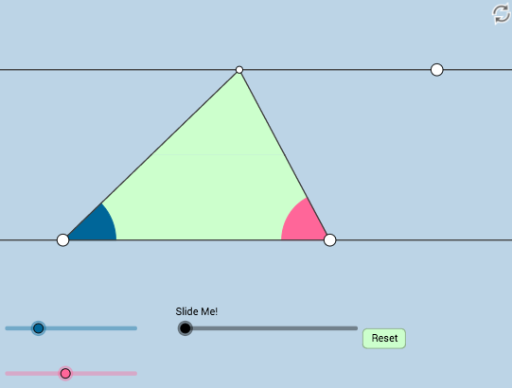
This example demonstrates how to dynamically explore the area calculation of a triangle. Key math concepts involved include the formula for the area of a triangle, angles, similarity transformations, and vectors. Construction highlights use GeoGebra commands and objects such as Rotate, Angle, Ray, Segment, Intersect, Midpoint, Line, OrthogonalLine, Polygon, Point, Circle, Dilate, Min, CircleSector, Vector, and Translate. Suitable for middle school and above students to understand triangle area calculation and geometric transformations.
GeoGebra Commands & Parameters
Rotate(A, α, B) → A'Angle(A, B, A') → γRay(B, A') → fRotate(B, (-β), A) → B'Angle(B', A, B) → δRay(A, B') → gSegment(B, A) → hIntersect(f, g) → CSegment(B, C) → iSegment(A, C) → jMidpoint(i) → DMidpoint(j) → ELine(B, A) → lOrthogonalLine(C, l) → mIntersect(l, m) → FSegment(C, F) → nPolygon(D, E, C) → poly1, c, d, eMidpoint(n) → GLine(C, l) → pPolygon(B, D, E, A) → poly2, b, d_1, e_1, aSegment(D, C) → qSegment(B, A) → rPoint(p) → HOrthogonalLine(H, p) → tIntersect(l, t) → ISegment(H, I) → sCircle(I, 3) → c_1Circle(H, 3) → f_1Intersect(f_1, p, 1) → JIntersect(f_1, p, 2) → KIntersect(c_1, l, 2) → LIntersect(c_1, s, 1) → MIntersect(c_1, l, 1) → NAngle(J, H, I) → εAngle(M, I, N) → ζDilate(H, If[0 < k ≤ 1, 1 - k, 0], I) → H'Segment(H, H') → g_1Angle(C, F, B) → ηDilate(C, If[1 < k ≤ 2, 2 - k, 0], G) → C'Segment(C, C') → h_1Dilate(G, If[2 < k ≤ 3, 3 - k, 0], F) → G'Segment(G, G') → i_1Rotate(C, If[3 < k ≤ 4, ((-(k - 3)) * π), (-π)], G) → C'_1Rotate(C', If[3 < k ≤ 4, ((-(k - 3)) * π), (-π)], G) → C''Segment(C'_1, C'') → j_1Dilate(G, If[4 < k ≤ 5, 5 - k, 0], D) → G'_1Dilate(G, If[4 < k ≤ 5, 5 - k, 0], E) → G'_2Segment(G, G'_1) → k_1Segment(G, G'_2) → l_1Segment(B, F) → m_1Segment(B, D) → n_1Segment(D, G) → p_1Segment(D, C) → q_1Min({m_1, n_1, p_1, q_1}) → oCircle(B, (0.6 * o)) → r_1Intersect(r_1, l) → O, PSegment(B, C) → s_1Intersect(r_1, s_1, 1) → QCircleSector(B, P, Q) → t_1Rotate(D, If[6 < k ≤ 7, ((-(k - 6)) * π), (-π)], E) → D'Rotate(E, If[6 < k ≤ 7, ((-(k - 6)) * π), (-π)], E) → E'Rotate(C, If[6 < k ≤ 7, ((-(k - 6)) * π), (-π)], E) → C'_2Polygon(D', E', C'_2) → poly1', c'_2, d', e'Segment(D, C) → a_1Segment(D, B) → b_1Segment(C, E) → f_2Segment(E, A) → g_2Segment(E, C'_2) → h_2Segment(C'_2, D') → i_2Segment(D', E) → j_2Dilate(D, If[7 < k ≤ 8, 8 - k, 0], C) → D'_1Segment(D, D'_1) → k_2Dilate(B, If[8 < k ≤ 9, 9 - k, 0], D) → B'_1Vector(B, B'_1) → uTranslate(t_1, u) → c_2Dilate(B, If[9 < k ≤ 10, 10 - k, 0], A) → B'_2Vector(B, B'_2) → vTranslate(t_1, v) → d_2Circle(A, Radius[r_1]) → e_2Intersect(e_2, l, 1) → RIntersect(e_2, g_2, 1) → SSegment(B, A) → l_2Segment(A, C) → m_2Min({l_2, m_2}) → wCircle(A, (0.25 * w)) → p_2Intersect(g_2, m_2) → TIntersect(g_2, m_2) → UIntersect(p_2, m_2) → V,Intersect(p_2, l_2) → W,CircleSector(A, V, W) → q_2
AI Drawing Prompt Reference
Draw triangle ABC, use rotation and angle calculations to find the height and midpoints, construct medians and perpendicular bisectors, apply similarity transformations and rotations to explore the area of the triangle dynamically, and finally use circle intersections and rotations to create dynamic effects.
The prompt above was compiled from the original drawing commands and is for reference only.