
Double Translation Tiling
Loading the math board and drawing, please wait…
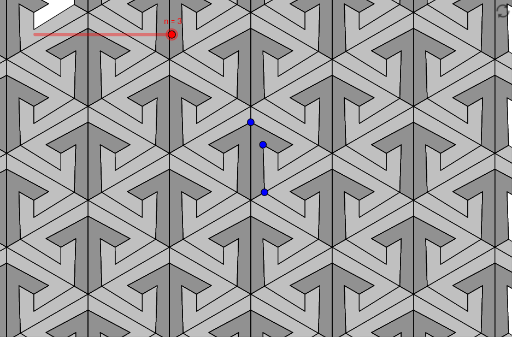
This example demonstrates tiling patterns generated through two translations. Key mathematical concepts include translation transformations and vectors. Using commands like Intersect, Point, Vector, Rotate, Polygon, Mirror, and Sequence, complex tiling patterns can be constructed. Suitable for middle school and above students to learn about geometric transformations and vectors.
GeoGebra Commands & Parameters
Intersect(xAxis, yAxis) → FPoint(yAxis) → EPoint(Line[F, Rotate[F + (1, 0), 30°, F]]) → AVector(Rotate[E, 120°, F], A) → uRotate(Translate[B, Vector[(-u)]], (-(120°)), F) → DIntersect(LineBisector[B, D], Rotate[Line[B, D], -30°, B]) → CPolygon({A, B, C, D, E, F}) → poly1Mirror(poly1, yAxis) → poly1'Sequence(Rotate[{poly1, poly1'}, i, F], i, 0, (2 * π), (2 * π / 3)) → liste1Sequence(Translate[liste1, Vector[(i * u)]], i, (-n), n) → liste2Vector(Rotate[A, -120°, F], E) → vSequence(Translate[liste2, Vector[(i * v)]], i, (-n), n) → liste3
AI Drawing Prompt Reference
Draw a tiling pattern created by two translations, starting with the intersection of the coordinate axes, then creating a point rotated by 30 degrees, defining a vector, and using rotations and translations to form a hexagon, followed by mirroring and sequencing operations to expand the pattern into a complex tessellation.
The prompt above was compiled from the original drawing commands and is for reference only.