
Double Reflection: Mirroring a Polygon Across Two Lines
Loading the math board and drawing, please wait…
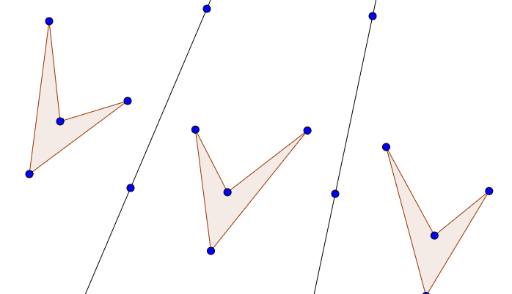
① This example demonstrates the geometric process of reflecting a polygon successively across two different lines, producing two consecutive mirror images and visually showing the composition of reflection transformations. ② Core mathematical concepts include axial symmetry (reflection) in plane geometry, composition of transformations, and the congruence between the original and reflected figures, with additional algebraic context involving rational numbers, exponents, and parametric curves. ③ Construction highlights: Using GeoGebra's Polygon command to create the original polygon poly1, Line commands to define two reflection axes a and b, and Mirror commands to reflect the polygon and its vertices (A, B, C, D, etc.) first across line a to obtain poly1', then across line b to obtain poly1''. All corresponding points (like A', A'') and edges (a', a'', etc.) are labeled to trace the transformation path. ④ Suitable for middle or high school geometry and enrichment courses, this example helps students understand properties of reflections, rules of composite transformations, and serves as an interactive demonstration for exploring symmetry and congruence.
GeoGebra Commands & Parameters
Polygon(A, B, C, D) → poly1, a, b, c, dLine(E, F) → fLine(G, H) → gMirror(A, f) → A'Mirror(B, f) → B'Mirror(C, f) → C'Mirror(D, f) → D'Polygon(A', B', C', D') → poly1', a', b', c', d'Mirror(A', g) → A''Mirror(B', g) → B''Mirror(C', g) → C''Mirror(D', g) → D''Polygon(A'', B'', C'', D'') → poly1'', a'', b'', c'', d''