
Domain and Range Demonstration
Loading the math board and drawing, please wait…
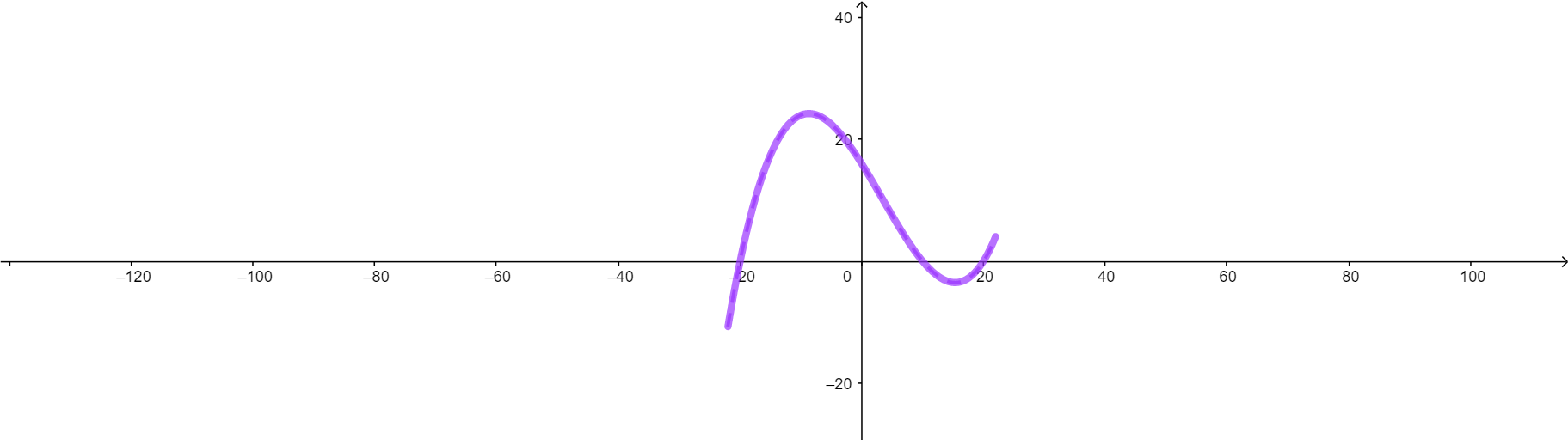
This example demonstrates the domain and range of a function. It involves key mathematical concepts such as functions, domain, and range. Using GeoGebra commands like CurveCartesian, Min, Max, etc., the function graph is constructed and its domain and range are observed. Suitable for high school mathematics education and learning.
GeoGebra Commands & Parameters
CurveCartesian(r, g(r), r, (-22 * (1 - b)), (22 * (1 - b))) → cMin(g, -22, -19) → AMax(g, -15, 0) → BSegment((0, -10.88), (0, 24.26)) → iCurveCartesian(q, ((((5 * 0.1) * ((0.2 * q) - 4)) * ((0.2 * q) + 4)) * ((0.2 * q) - 2)), q, -22, 22) → jCurveCartesian(o, f(o), o, -22, 10) → lSegment(C, D) → mCurveCartesian(v, f(v / (1 - b)), v, (-22 * (1 - b)), (10 * (1 - b))) → nSegment(E, F) → pSegment((0, -20), (0, 24.65)) → qSegment((10, -20), (22, 20)) → rCurveCartesian(w, (((0.5 * ((0.2 * w) - 4)) * ((0.2 * w) + 4)) * ((0.2 * w) - 2)), w, -22, 10) → sCurveCartesian(z, (((((5 - a) * 0.1) * (((0.2 * z)) / (1 - b) - 4)) * (((0.2 * z)) / (1 - b) + 4)) * (((0.2 * z)) / (1 - b) - 2)), z, -22 + (22 * b), 5 - (5 * b)) → vSegment(P, O) → f_1Intersect(f_1, xAxis) → SPoint(yAxis) → TSegment(S, T) → g_1CurveCartesian(z, ((((5 * 0.1) * ((0.2 * z) - 4)) * ((0.2 * z) + 4)) * ((0.2 * z) - 2)), z, -22, 5) → wSegment((10, -15), (22, 2.5)) → h_1
AI Drawing Prompt Reference
Draw a function graph to demonstrate its domain and range. First, plot the function curve, then mark the minimum and maximum values of the domain. Next, draw the boundary lines for the range. Finally, draw the function curves with different parameters to observe their changes within the domain.
The prompt above was compiled from the original drawing commands and is for reference only.