
Dodecahedron Coordinates
Loading the math board and drawing, please wait…
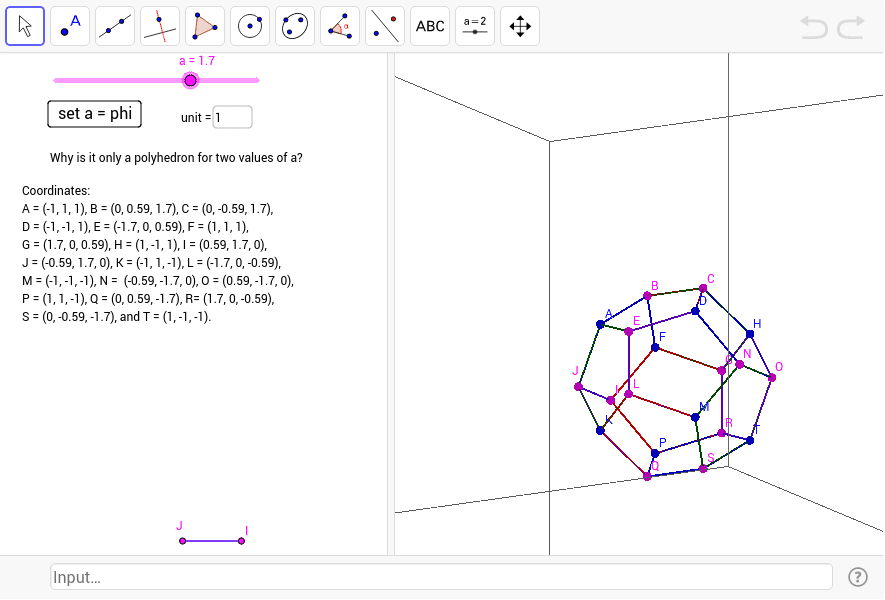
This example demonstrates how to construct the vertices of a regular dodecahedron using coordinates. It involves core mathematical concepts such as 3D coordinates, vectors, and polygon construction. Key GeoGebra commands and objects used include Polygon, Textfield, and various geometric entities like u, a, A, B, C, E, D, poly1, a_1, b, c, d, e, button1, F, G, H, poly2, c_1, b_1, f, g, h, I, J, poly3, a_2, b_2, f_1, i, j, K, L, poly4, e_1, a_3, j_1, k, l, M. This is suitable for high school and above students learning about polyhedra in solid geometry.
GeoGebra Commands & Parameters
Polygon(A, B, C, D, E) → poly1, a_1, b, c, d, ePolygon(C, B, F, G, H) → poly2, c_1, b_1, f, g, hPolygon(A, B, F, I, J) → poly3, a_2, b_2, f_1, i, jPolygon(E, A, J, K, L) → poly4, e_1, a_3, j_1, k, lPolygon(D, E, L, M, N) → poly5, d_1, e_2, l_1, m, nPolygon(D, C, H, O, N) → poly6, d_2, c_2, h_1, o, n_1Polygon(K, J, I, P, Q) → poly7, k_1, j_2, i_1, p, qPolygon(G, F, I, P, R) → poly8, g_1, f_2, i_2, p_1, rPolygon(S, M, L, K, Q) → poly10, s_1, m_2, l_2, k_2, q_1Polygon(S, M, N, O, T) → poly9, s, m_1, n_2, o_1, tPolygon(T, O, H, G, R) → poly11, t_1, o_2, h_2, g_2, r_1Polygon(S, T, R, P, Q) → poly12, s_2, t_2, r_2, p_2, q_2Textfield(u) → inputBox1
AI Drawing Prompt Reference
Draw a regular dodecahedron using 3D coordinates and vectors, first defining the positions of its twelve vertices, then connecting them to form twelve faces each consisting of five equilateral triangles, and finally label the key vertices and faces for clarity.
The prompt above was compiled from the original drawing commands and is for reference only.