
Divisibility by 2 and 5
Loading the math board and drawing, please wait…
In collections
Teilbarkeitsregeln
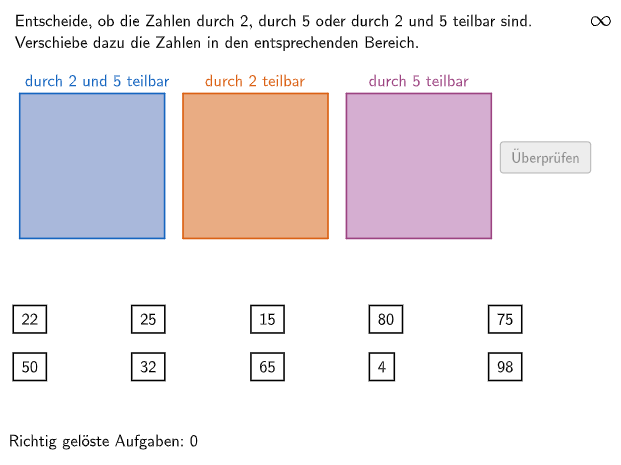
This example demonstrates how to use GeoGebra to explore the divisibility rules for 2 and 5. The underlying math concepts include divisibility, factors, and multiples. The construction involves using GeoGebra commands such as Polygon, Shuffle, Midpoint, etc. to create the graph. It is suitable for middle school math education, particularly for learning divisibility and factors.
GeoGebra Commands & Parameters
Polygon(Q1E1, Q1E2, 4) → Q1, q1_1, q1_2, q1_3, q1_4, Q1E3, Q1E4Polygon(Q2E1, Q2E2, 4) → Q2, q2_1, q2_2, q2_3, q2_4, Q2E3, Q2E4Polygon(Q3E1, Q3E2, 4) → Q3, q3_4, q3_1, q3_2, q3_3, Q3E3, Q3E4Shuffle(Sequence[Element[Shuffle[Sequence[(k * 5), k, 1, 20]], i], i, 1, 6]) → RandomList5, {20, 25, 15, 50, 65, 75}Shuffle(Sequence[Element[Shuffle[Sequence[(k * 2), k, 1, 50]], i], i, 1, 6]) → RandomList2, {22, 20, 98, 4, 44, 32}Shuffle(Sequence[Element[Shuffle[Sequence[(k * 10), k, 1, 10]], i], i, 1, 6]) → RandomList10, {80, 90, 30, 30, 50, 50}Shuffle(Unique[Join[{RandomList2, RandomList5, RandomList10}]]) → RandomListNum, {22, 25, 15, 80, 75, 50, 32, 65, 4, 98, 90, 44, 20, 30}Midpoint(Corner[NumText7, 1], Corner[NumText7, 3]) → Pos7Midpoint(Corner[NumText10, 1], Corner[NumText10, 3]) → Pos10Midpoint(Corner[T1830, 1], Corner[T1830, 3]) → Pos1830Midpoint(Corner[NumText6, 1], Corner[NumText6, 3]) → Pos6Midpoint(Corner[NumText3, 1], Corner[NumText3, 3]) → Pos3Midpoint(Corner[T1826, 1], Corner[T1826, 3]) → Pos1826Midpoint(Corner[NumText5, 1], Corner[NumText5, 3]) → Pos5Midpoint(Corner[NumText9, 1], Corner[NumText9, 3]) → Pos9Midpoint(Corner[T2628, 1], Corner[T2628, 3]) → Pos2628Midpoint(Corner[NumText8, 1], Corner[NumText8, 3]) → Pos8Midpoint(Corner[NumText4, 1], Corner[NumText4, 3]) → Pos4Midpoint(Corner[NumText2, 1], Corner[NumText2, 3]) → Pos2Midpoint(Corner[NumText1, 1], Corner[NumText1, 3]) → Pos1Textfield(aInput) → InputBox1Textfield(bInput) → InputBox2Polygon(PtopLeftCornerFeedback, PtopRightCornerFeedback, PbottomRightCornerFeedback, PbottomLeftCornerFeedback) → rectangleCorrect, ptopleftcornerfeedback, ptoprightcornerfeedback, pbottomrightcornerfeedback, pbottomleftcornerfeedbackShuffle(Sequence[Random[0, 10], i, 1, 100]) → randomNosForX, {8, 10, 10, 2, 5, 1, 1, 3, 0, 9, 4, 0, 2, 2, 2, 1, 0, 7, 0, 5, 1, 8, 8, 3, 7, 1, 9, 2, 2, 1, 6, 6, 0, 4, 4, 8, 4, 10, 2, 2, 8, 7, 10, 7, 7, 7, 9, 0, 10, 8, 5, 1, 0, 2, 2, 8, 6, 1, 6, 0, 5, 8, 10, 0, 6, 4, 7, 7, 0, 8, 10, 7, 2, 0, 5, 9, 0, 2, 5, 10, 3, 2, 10, 9, 7, 7, 1, 3, 5, 6, 4, 8, 6, 8, 1, 6, 2, 10, 7, 1}Element(randomNosForX, Mod[questionCount, 100] + 1) → numXShuffle(Sequence[Random[0, 10], i, 1, 100]) → randomNosForY, {10, 7, 9, 9, 1, 5, 8, 1, 6, 1, 10, 2, 3, 5, 7, 7, 2, 8, 2, 9, 9, 5, 3, 1, 6, 5, 8, 1, 8, 4, 5, 3, 7, 6, 8, 10, 0, 6, 7, 10, 5, 9, 8, 5, 4, 4, 5, 0, 9, 1, 8, 0, 7, 7, 10, 2, 5, 3, 4, 1, 0, 5, 6, 0, 9, 4, 5, 7, 6, 6, 7, 1, 2, 3, 6, 8, 6, 4, 1, 10, 2, 3, 0, 10, 8, 5, 3, 8, 10, 8, 0, 5, 4, 6, 1, 7, 0, 1, 9, 8}Element(randomNosForY, Mod[questionCount, 100] + 1) → numYAppend(true, Sequence[If[randomNosForX(i) ≟ randomNosForX(i - 1), false, true], i, 2, 100]) → stayXAppend(true, Sequence[If[randomNosForY(i) ≟ randomNosForY(i - 1), false, true], i, 2, 100]) → stayYRemove(Sequence[If[stayX(i), randomNosForX(i), 0], i, 1, 100], Sequence[0, i, 1, 100]) → randomNosForXwithoutRepeatRemove(Sequence[If[stayY(i), randomNosForY(i), 0], i, 1, 100], Sequence[0, i, 1, 100]) → randomNosForYwithoutRepeatElement(randomNosForXwithoutRepeat, Mod[questionCount, Length[randomNosForXwithoutRepeat]] + 1) → numXwithoutRepeatElement(randomNosForYwithoutRepeat, Mod[questionCount, Length[randomNosForYwithoutRepeat]] + 1) → numYwithoutRepeatIf(Mod[num1, 10] ≟ 0, 1, Mod[num1, 5] ≟ 0, 3, 2) → num1metaIf(Mod[num2, 10] ≟ 0, 1, Mod[num2, 5] ≟ 0, 3, 2) → num2metaIf(Mod[num3, 10] ≟ 0, 1, Mod[num3, 5] ≟ 0, 3, 2) → num3metaIf(Mod[num4, 10] ≟ 0, 1, Mod[num4, 5] ≟ 0, 3, 2) → num4metaIf(Mod[num5, 10] ≟ 0, 1, Mod[num5, 5] ≟ 0, 3, 2) → num5metaIf(Mod[num6, 10] ≟ 0, 1, Mod[num6, 5] ≟ 0, 3, 2) → num6metaIf(Mod[num7, 10] ≟ 0, 1, Mod[num7, 5] ≟ 0, 3, 2) → num7metaIf(Mod[num8, 10] ≟ 0, 1, Mod[num8, 5] ≟ 0, 3, 2) → num8metaIf(Mod[num9, 10] ≟ 0, 1, Mod[num9, 5] ≟ 0, 3, 2) → num9metaIf(Mod[num10, 10] ≟ 0, 1, Mod[num10, 5] ≟ 0, 3, 2) → num10metaIsInRegion(Pos1, If[num1meta ≟ 1, Q1, num1meta ≟ 2, Q2, Q3]) → correct1IsInRegion(Pos2, If[num2meta ≟ 1, Q1, num2meta ≟ 2, Q2, Q3]) → correct2IsInRegion(Pos3, If[num3meta ≟ 1, Q1, num3meta ≟ 2, Q2, Q3]) → correct3IsInRegion(Pos4, If[num4meta ≟ 1, Q1, num4meta ≟ 2, Q2, Q3]) → correct4IsInRegion(Pos5, If[num5meta ≟ 1, Q1, num5meta ≟ 2, Q2, Q3]) → correct5IsInRegion(Pos6, If[num6meta ≟ 1, Q1, num6meta ≟ 2, Q2, Q3]) → correct6IsInRegion(Pos7, If[num7meta ≟ 1, Q1, num7meta ≟ 2, Q2, Q3]) → correct7IsInRegion(Pos8, If[num8meta ≟ 1, Q1, num8meta ≟ 2, Q2, Q3]) → correct8IsInRegion(Pos9, If[num9meta ≟ 1, Q1, num9meta ≟ 2, Q2, Q3]) → correct9IsInRegion(Pos10, If[num10meta ≟ 1, Q1, num10meta ≟ 2, Q2, Q3]) → correct10Join(Sequence[Element[Sequence[Sequence[Q2E1 + ((i * dfx), ((-k) * dfy)), i, 0, 2], k, 0, 3], j], j, 1, 4]) → PunkteMenge2Join(Sequence[Element[Sequence[Sequence[Q1E1 + ((i * dfx), ((-k) * dfy)), i, 0, 2], k, 0, 3], j], j, 1, 4]) → PunkteMenge1Join(Sequence[Element[Sequence[Sequence[Q3E1 + ((i * dfx), ((-k) * dfy)), i, 0, 2], k, 0, 3], j], j, 1, 4]) → PunkteMenge3Text(CorrHelper, A, false, true, 0, 0) → Text11Length(RandomListNum) → a
AI Drawing Prompt Reference
Create a graphic to explore the divisibility rules for 2 and 5. Start by drawing three polygons Q1, Q2, and Q3 to represent multiples of 2 and 5. Then, randomly generate some numbers and distribute them among these polygons. Next, based on whether the numbers are divisible by 2 or 5, place them in the corresponding polygons. Finally, drag points Pos1 to Pos10 to check if they are in the correct polygons to verify the divisibility rules.
The prompt above was compiled from the original drawing commands and is for reference only.