
Discovering the Triangle Orthocenter via Altitudes
Loading the math board and drawing, please wait…
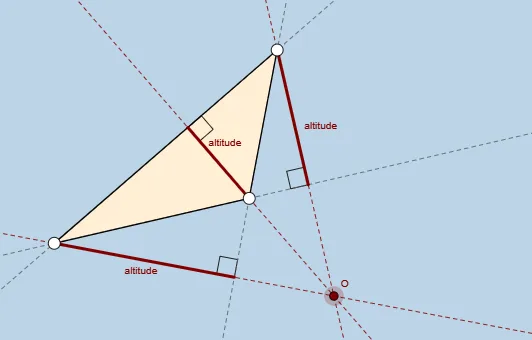
This example demonstrates how the orthocenter of an arbitrary triangle arises as the common intersection point of its altitudes. Students can visually verify that two (and hence all) altitude lines meet at a single point, strengthening understanding of the orthocenter as a fundamental triangle center. Key concepts include triangle altitudes, perpendicularity, constructing lines from angle/orthogonality constraints, and using line intersections to define special points. The construction uses GeoGebra commands such as Segment and Line/Polygon to form the triangle and relevant lines, OrthogonalLine to draw the altitude through a vertex perpendicular to the opposite side, and Intersect to compute the intersection point that becomes the orthocenter (labeled as H). Angle is used for geometric referencing/constraints, while additional point and line objects (e.g., vertices and auxiliary altitude-related elements) support clear annotation. Suitable for middle school and high school geometry, as an interactive activity for exploring triangle properties and practicing geometric construction reasoning.
GeoGebra Commands & Parameters
Segment(A, B) → aSegment(B, C) → bSegment(C, A) → cOrthogonalLine(C, a) → dOrthogonalLine(A, b) → eOrthogonalLine(B, c) → fIntersect(d, e) → OIntersect(d, a) → EIntersect(f, c) → FIntersect(e, b) → GSegment(C, E) → gSegment(B, F) → hSegment(A, G) → iAngle(C, E, A) → αAngle(B, F, C) → βAngle(A, G, B) → γLine(A, B) → jIntersect(d, j) → DSegment(C, D) → kAngle(C, D, B) → δLine(B, C) → lPolygon(A, B, C) → poly1, c_1, a_1, b_1Intersect(e, l) → HSegment(A, H) → mAngle(A, H, C) → εLine(C, A) → nIntersect(f, n) → ISegment(B, I) → pAngle(B, I, A) → ζ
AI Drawing Prompt Reference
Draw an arbitrary triangle. From each vertex, construct a line perpendicular to the opposite side, creating three altitudes. These three altitude lines should intersect at a single common point, the orthocenter. Mark the foot of each altitude on the corresponding side, and draw the segment from each vertex to its foot. Add right-angle marks at each foot to indicate perpendicularity. Finally, outline the triangle with its three sides, and clearly label the orthocenter.
The prompt above was compiled from the original drawing commands and is for reference only.