
Discovering the Formula for the Volume of a Sphere
Loading the math board and drawing, please wait…
GeoGebra Commands & Parameters
Sequence((ii, f_1(ii)), ii, 0, 4, 0.1) → l3Zip(abs(y(A) - y(PP)), PP, l3) → l2Element(l3, IndexOf[Min[l2], l2]) → ECorner(5) → AppSizeSegment((-2, 0), (-2, 4)) → fSegment((2, 0), (2, 4)) → gCircle(A, 2) → cSegment((0, -1), (2, -1)) → RTranslate(hGuideline, Vector[(Vector[Corner[4], Corner[1]] / 500 * 16)]) → hGuideline'Segment((3, 0), (3, 4)) → HText("\frac{1}{3}", B, true, true, 1, 0) → text4Text("\frac{2}{3}", C, true, true, 1, 0) → text5Text("1", D, true, true, 1, 0) → text6Zip(Segment[PP - (0.1, 0), PP + (0.1, 0)], PP, {B, C, D}) → l1Mirror(f_1, t) → oIntersect(c, Line[(0, heightWater), (1, heightWater)]) → F, GIf(Defined[G], abs(x) ≥ x(G) ∧ r(x) ≤ y ≤ heightWater, r(x) ≤ y ≤ heightWater) → vexpandCircle(A, 92 + (7 * pulsing), Corner[1], Corner[3], Corner[5]) → pulsingObjectonboardingTextOffset(Corner[onboardingText_{1}, 1], Corner[onboardingText_{1}, 3], onboardingCase_{1}, Corner[1], Corner[3], Corner[5]) → OnboardingTextOffset_{1}
AI Drawing Prompt Reference
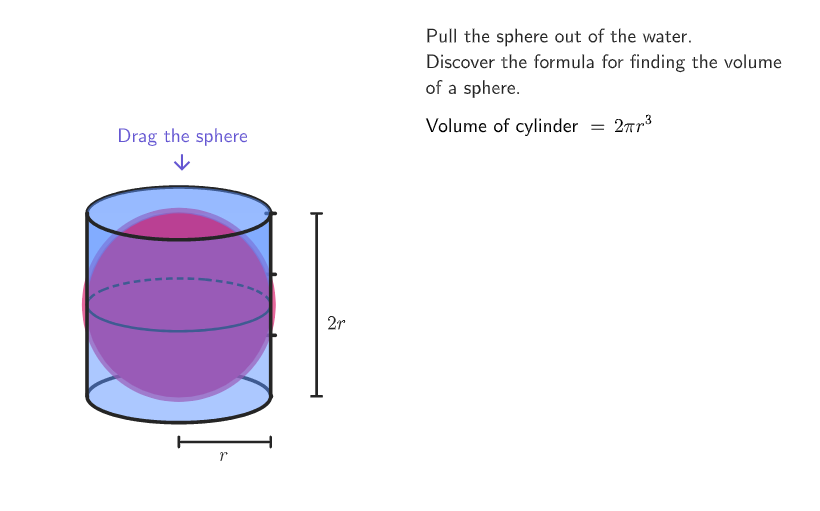
Draw a cylinder and a sphere, with part of the sphere submerged in the cylinder. Start by drawing a cylinder with a height of 4 and its base on the x-axis. Then draw a sphere with a radius of 2, centered at the bottom of the cylinder. Next, draw a horizontal line segment at height 4 as the cylinder's boundary. Finally, draw three vertical line segments marking heights of 1/3, 2/3, and 1 to indicate different depths of the sphere submerged in the cylinder.
The prompt above was compiled from the original drawing commands and is for reference only.