
Disc Method Demonstration
Loading the math board and drawing, please wait…
In collections
volume of revolution
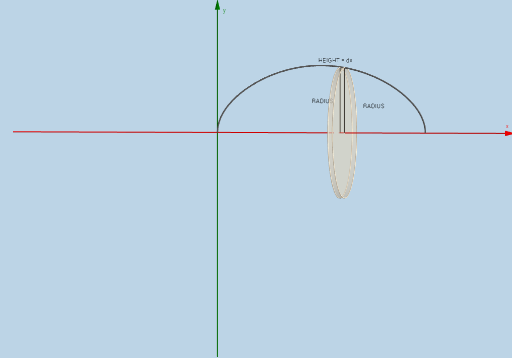
This example demonstrates the calculation of the volume of a solid of revolution using the disc method. It involves core mathematical concepts such as integration, volume calculation of rotated bodies, and function graphs. GeoGebra commands and objects like Sequence, Rotate, Intersect, Polygon, Circle, Surface, Cylinder, Dilate, Segment, Textfield, and Integral are used in the construction. Suitable for high school and above students to learn and understand the application of integration in volume calculations.
GeoGebra Commands & Parameters
Sequence(Polygon[(a + (i * deltax), 0), (a + ((i + 1) * deltax), 0), (a + ((i + 1) * deltax), f(a + ((i + 1) * deltax))), (a + (i * deltax), f(a + ((i + 1) * deltax)))], i, 0, n - 1, 1) → list1Rotate(list1, α, y = 0) → list1'Intersect(i, l) → BIntersect(k, l) → CIntersect(j, k) → DPolygon(C, B, A, D) → poly1, c_2, b_1, a_1, dRotate(C, α, y = 0) → C'Rotate(B, α, y = 0) → B'Rotate(A, α, y = 0) → A'Rotate(D, α, y = 0) → D'Polygon(C', B', A', D') → poly1', c', b', a', d'Sequence((a + (i * deltax), 0), i, 0, n, 1) → list2Sequence((a + (i * deltax), f(a + (i * deltax))), i, 1, n, 1) → list3Rotate(list3, α, y = 0) → list3'Sequence((a + (i * deltax), f(a + ((i + 1) * deltax))), i, 0, n - 1, 1) → list4Sequence(x = a + (i * deltax), i, 1, n, 1) → list6Sequence(Segment[Element[list3, i], Element[list4, i]], i, 0, n, 1) → list5Sequence(CircleSector[Element[list2, i + 1], Element[list3', i], Element[list3, i], xOyPlane], i, 1, n, 1) → list7Sequence(Cylinder[Element[list2, i], Element[list2, i + 1], f(Element[list2, i + 1])], i, 1, n, 1) → list8Sequence(Circle[Element[list2, i], f(Element[list2, i]), x = 0], i, 2, n + 1, 1) → list10Circle((a, 0), f(a + deltax), x = 0) → pSurface(q, α) → eCylinder((x(A), 0), (x(A) - deltax, 0), y(A)) → o, r, s, tDilate(E, If[0 < u ≤ 1, 1 - u, 0], D) → E'Dilate(F, If[0 < u ≤ 1, 1 - u, 0], A) → F'Segment(E, E') → f_1Segment(F, F') → g_1Dilate(D, If[1 < u ≤ 2, 2 - u, 0], A) → D'_1Segment(D, D'_1) → h_1Rotate(F, α, y = 0) → F'_1Rotate(F', α, y = 0) → F''Segment(F'_1, F'') → i_1Rotate(E, α, y = 0) → E'_1Rotate(E', α, y = 0) → E''Segment(E'_1, E'') → j_1Rotate(D, α, y = 0) → D'_2Rotate(D'_1, α, y = 0) → GSegment(D'_2, G) → k_1Textfield(f) → InputBox1Textfield(a) → InputBox2Textfield(b) → InputBox3Integral(f, a, b) → m_1
AI Drawing Prompt Reference
Create a 3D demonstration of the disc method for volume of revolution. Show a function curve on the x-axis from a to b, divided into n vertical slices. Each slice is rotated around the x-axis to form cylindrical discs or shells. Display the original curve, the rotated surface, several representative cylinders, circular cross-sections, and connecting segments between original and rotated points. Include an integral area indicator and input boxes for adjusting the function, interval, and number of slices. The scene illustrates how integration computes the volume of a solid of revolution.
The prompt above was compiled from the original drawing commands and is for reference only.