
Dilation Transformation Demo by Wendy Sanchez
Loading the math board and drawing, please wait…
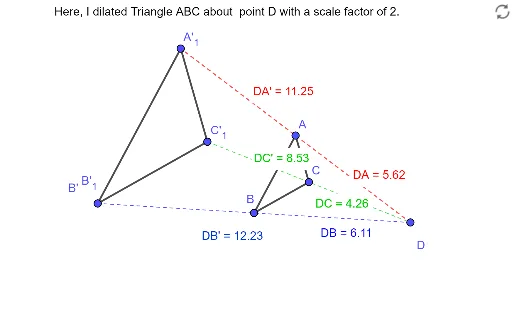
This example demonstrates the effect of a geometric transformation, specifically dilation (scaling), on plane figures. Key math concepts include dilation, plane shapes, geometric transformations, and distance measurement. Constructed using GeoGebra commands like Segment, Dilate, and Distance to visualize the pre-image and image relationships. Suitable for middle school and high school students learning about geometric transformations and properties of shapes, as well as for classroom demonstrations.
GeoGebra Commands & Parameters
Segment(A, B) → fSegment(B, C) → gSegment(C, A) → hDilate(A, 2, D) → A'Dilate(B, 2, D) → B'Segment(A', B') → f'Dilate(B, 2, D) → B'_1Dilate(C, 2, D) → C'Segment(B'_1, C') → g'Dilate(C, 2, D) → C'_1Dilate(A, 2, D) → A'_1Segment(C'_1, A'_1) → h'Segment(D, A') → iDistance(D, A') → distanceDA'Distance(D, A) → distanceDASegment(C', D) → jDistance(D, C') → distanceDC'Distance(D, C) → distanceDCSegment(D, B') → kDistance(D, B') → distanceDB'Distance(D, B) → distanceDB
AI Drawing Prompt Reference
Draw a triangle ABC, then dilate it by a factor of 2 with point D as the center to get triangle A'B'C'. Connect A'B', B'C', and C'A', and measure the distances from D to A', B', and C'.
The prompt above was compiled from the original drawing commands and is for reference only.