
Dilation on Line Paper 1
Loading the math board and drawing, please wait…
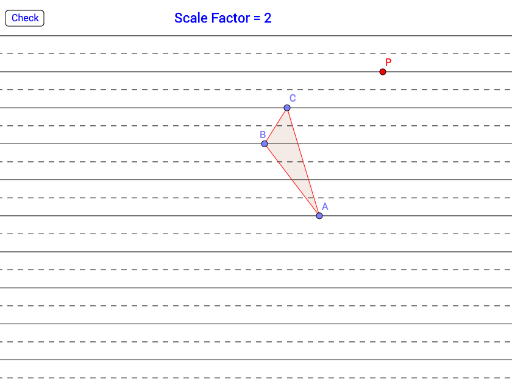
① This example demonstrates a dilation (scaling) of a polygon on grid paper, showing how the image relates to the original through a center and scale factor. ② Core mathematical concepts include dilation (homothety), similarity, proportional lengths, and the property that lines connecting corresponding points pass through the dilation center; it also touches on quadratic functions and orthocenter as extensions. ③ Construction uses GeoGebra commands such as Line, Point, OrthogonalLine, Intersect, LineBisector, Polygon, Dilate, and AreEqual, involving many objects (points like A_2, B_2, C_2; lines f, g, h; polygons) to create and verify the dilated figure. ④ Suitable for middle-to-high school students learning geometric transformations, ideal for interactive exploration of dilation properties or as a teacher resource for dynamic geometry lessons.
GeoGebra Commands & Parameters
Line(A_2, B_2) → fLine(C_2, D_2) → gLine(E, F) → hLine(G, H) → iLine(I, J) → jLine(K, L) → kLine(M, N) → lLine(O, P_1) → mLine(Q, R) → nLine(S, T) → pLine(U, V) → qPoint(q) → F_1OrthogonalLine(F_1, q) → rIntersect(k, r) → G_1Intersect(j, r) → H_1Intersect(i, r) → I_1Intersect(r, h) → J_1Intersect(g, r) → K_1Intersect(f, r) → L_1Intersect(l, r) → M_1Intersect(r, m) → N_1Intersect(n, r) → O_1LineBisector(F_1, G_1) → sLineBisector(G_1, H_1) → tLineBisector(H_1, I_1) → aLineBisector(I_1, J_1) → bLineBisector(J_1, K_1) → cLineBisector(K_1, L_1) → dLineBisector(L_1, M_1) → eLineBisector(M_1, N_1) → f_1LineBisector(N_1, O_1) → g_1Line(W, Z) → h_1Line(A_1, B_1) → i_1Point(q) → C_1LineBisector(A_1, C_1) → j_1Point(j) → BPoint(k) → CPoint(h) → APolygon(A, B, C) → poly1, k_1, l_1, m_1Point(q) → PDilate(A, scaleFactor, P) → A'Dilate(B, scaleFactor, P) → B'Dilate(C, scaleFactor, P) → C'Polygon(A', B', C') → targetPoly, n_1, p_1, q_1AreEqual(m_1, targetPoly) → isEqual
AI Drawing Prompt Reference
Draw a polygon and its dilated image on grid paper. Start with a set of parallel lines, then construct a perpendicular line intersecting them, marking intersection points. Draw perpendicular bisectors between consecutive points. Next, pick three points on another set of lines to form a triangle. Using a fixed center and a scale factor, dilate each vertex of the triangle to obtain a new triangle. Finally, check if the two triangles are congruent and show that lines connecting corresponding vertices pass through the dilation center.
The prompt above was compiled from the original drawing commands and is for reference only.