
Detailed Sphere Section
Loading the math board and drawing, please wait…
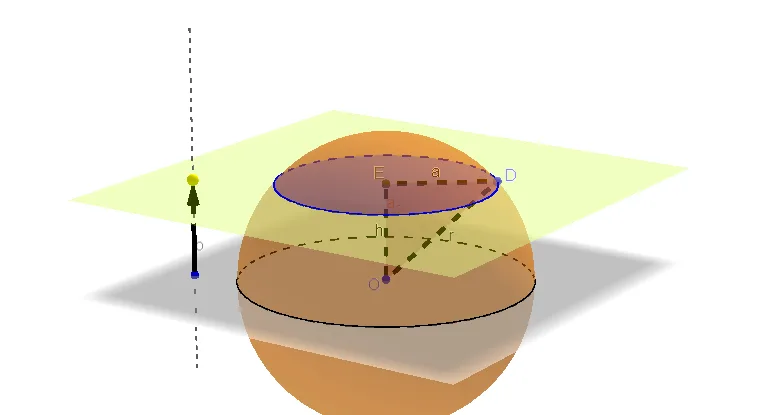
This example demonstrates the geometric construction and properties of a sphere section. It involves core math concepts like sphere, scalene triangles, real numbers, exponent, dilation, and equilateral triangles. Construction highlights include commands like Circle, Sphere, OrthogonalLine, Point, Vector, Plane, IntersectPath, Intersect, Segment, and Polygon. Suitable for high school solid geometry education, exploring the relationship between sphere sections and polygons.
GeoGebra Commands & Parameters
Circle(O, 3, zAxis) → cSphere(O, 3) → a_2OrthogonalLine(B, xOyPlane) → bPoint(b) → CVector(B, C) → uPlane(C, xOyPlane) → dIntersectPath(d, a_2) → ePoint(e) → DIntersect(zAxis, d) → ESegment(D, E) → aSegment(D, O) → rSegment(O, E) → hPolygon(O, E, D) → poly1, h_2, a_1, e_1
AI Drawing Prompt Reference
Draw a sphere with radius 3 centered at the origin, and show its horizontal great circle. From a point on the vertical axis above the center, drop a perpendicular to the horizontal plane, and pick an arbitrary point on this perpendicular line. Connect this point to the center to form a vector. Through this point, construct a plane parallel to the horizontal plane, which intersects the sphere in a circular cross-section. Choose a point on this circle, and connect it to the center, to the vertical-axis intersection point, and connect the center to that intersection point, forming a right triangle. Finally, draw the triangle with vertices at the center, the vertical-axis intersection, and the chosen point, and highlight the segments.
The prompt above was compiled from the original drawing commands and is for reference only.