
Design Your Own Robe with Symmetry
Loading the math board and drawing, please wait…
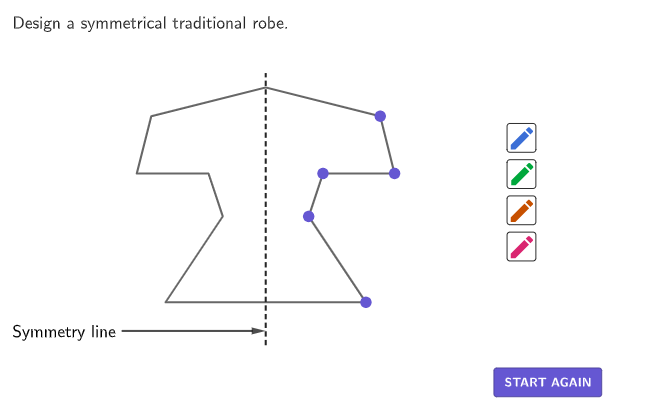
Explore line symmetry in fashion design by sketching symmetrical patterns in different colors. This example demonstrates how to create symmetrical figures using GeoGebra commands like Segment, Point, Polygon, and Vector. It covers core math concepts of symmetry and is suitable for upper elementary students learning geometric constructions.
GeoGebra Commands & Parameters
Segment((0, 1), (0, 20)) → symmetryLineboxTool(10, 19, (0, 2.5)) → drawAreaPoint(Segment[(0, 10), (0, 20)]) → P1Point(Segment[(0, 10), (0, 0)]) → P7PointIn(drawArea) → P2PointIn(drawArea) → P3PointIn(drawArea) → P4PointIn(drawArea) → P5PointIn(drawArea) → P6Polygon({P1, P2, P3, P4, P5, P6, P7, Mirror[P6, yAxis], Mirror[P5, yAxis], Mirror[P4, yAxis], Mirror[P3, yAxis], Mirror[P2, yAxis]}) → robeOutlinePointIn(sketchRegion) → PDrawBluePointIn(sketchRegion) → PDrawGreenPointIn(sketchRegion) → PDrawOrangePointIn(sketchRegion) → PDrawPinkIf(Length[drawPink] ≤ 1, {PolyLine[dummy]}, {PolyLine[drawPink], PolyLine[Mirror[drawPink, yAxis]]}) → designPinkIf(Length[drawGreen] ≤ 1, {PolyLine[dummy]}, {PolyLine[drawGreen], PolyLine[Mirror[drawGreen, yAxis]]}) → designGreenIf(Length[drawOrange] ≤ 1, {PolyLine[dummy]}, {PolyLine[drawOrange], PolyLine[Mirror[drawOrange, yAxis]]}) → designOrangeVector((-10, 2), (0, 2)) → vSymmetryElement({"allPink", "allGreen", "allBlue", "allOrange"}, currentPen) → currentMasterListElement({"drawPink", "drawGreen", "drawBlue", "drawOrange"}, currentPen) → currentPointsZip({PolyLine[A], PolyLine[Mirror[A, yAxis]]}, A, allOrange) → allDesignOrangeZip({PolyLine[A], PolyLine[Mirror[A, yAxis]]}, A, allPink) → allDesignPinkZip({PolyLine[A], PolyLine[Mirror[A, yAxis]]}, A, allBlue) → allDesignBlueZip({PolyLine[A], PolyLine[Mirror[A, yAxis]]}, A, allGreen) → allDesignGreenLength(allDesignBlue) → test
AI Drawing Prompt Reference
Draw a symmetric clothing pattern with a vertical symmetry axis and multiple symmetric points. The pattern includes lines of different colors that are mirrored on both sides of the axis. Construct it by first drawing the axis, then adding symmetric points, and finally drawing mirrored lines.
The prompt above was compiled from the original drawing commands and is for reference only.