
Deriving the Equation for the Cartesian Parabola
Loading the math board and drawing, please wait…
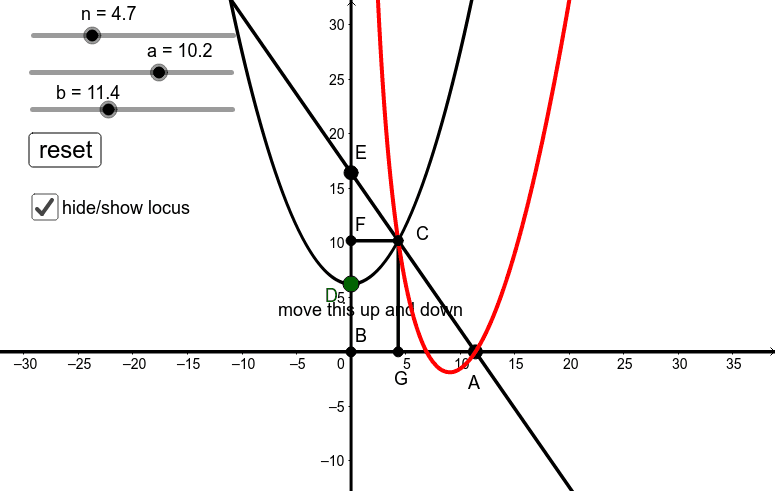
This GeoGebra example demonstrates the derivation of the Cartesian parabola equation through dynamic geometric construction. The core mathematical concept is the parabola as a conic section, and the use of locus to generate a set of points satisfying a given geometric condition, thereby visualizing the definition and equation of the parabola. The construction uses commands such as Point, Line, Intersect, OrthogonalLine, Segment, and Locus, with objects including points, lines, auxiliary elements, text, and buttons for interactive exploration. Suitable for high school or college analytic geometry courses, this example helps students understand the geometric origin of the parabola equation and serves as an interactive teaching tool for dynamic geometry.
GeoGebra Commands & Parameters
Point({b, 0}) → APoint(d) → DPoint({0, y(D) + a}) → ELine(E, A) → ePoint({0, 0}) → BIntersect(d, yAxis) → HIntersect(c, e, 1) → COrthogonalLine(C, d) → hLine(C, d) → iIntersect(i, j) → GIntersect(h, d) → FSegment(C, G) → kSegment(C, F) → lLocus(C, D) → loc1
AI Drawing Prompt Reference
Draw a parabola with focus D and directrix d. Start by creating points A and D on the x-axis, then create point E and draw line e. Next, create the origin B, find the intersection H of d and the y-axis, and the intersection C of c and e. Draw a line h perpendicular to d through C, then draw line i from C to d, find the intersection G of i and j, and the intersection F of h and d. Finally, connect CG and CF, and generate the locus loc1 through C and D, which represents the parabola.
The prompt above was compiled from the original drawing commands and is for reference only.