
Demonstration of Multiplication Commutative Law
Loading the math board and drawing, please wait…
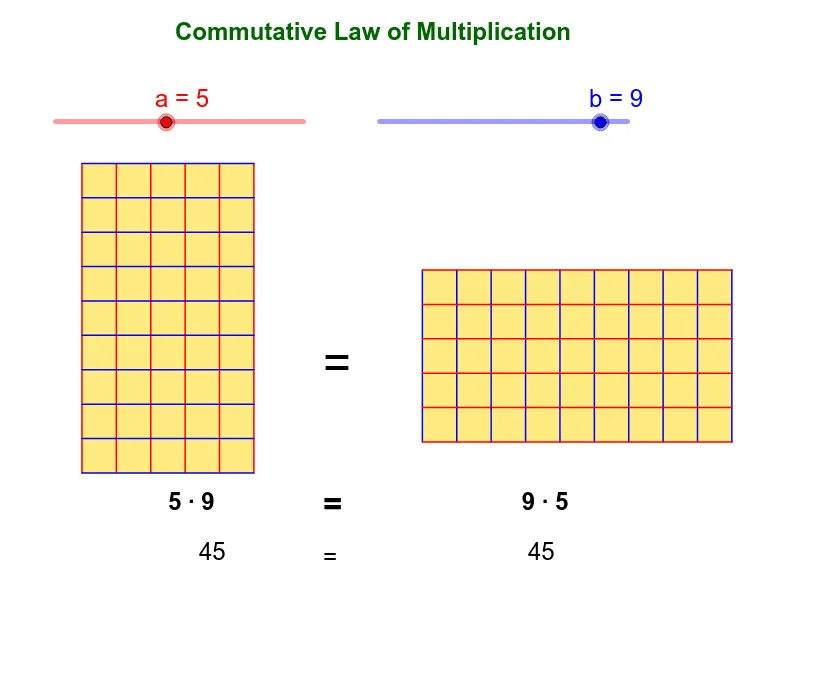
This example demonstrates the commutative law of multiplication, a×b=b×a, from a 2-dimensional perspective. Key mathematical concepts include multiplication and geometric construction. Commands used include If, Sequence, Polygon, etc. By adjusting the values of a and b, the geometric representation of the commutative law is observed. Suitable for middle school and above students to learn about the commutative law of multiplication and its geometric meaning.
GeoGebra Commands & Parameters
If(a < 4, 2, If[a < 7, 1.5, 1]) → AxIf(b < 4, 2, If[b < 7, 1.5, 1]) → AyIf(a < 4, 2, If[a < 7, 3.5, 5]) → daIf(b < 4, 2, If[b < 7, 3.5, 5]) → dbIf(da / a < db / b, da / a, db / b) → disIf(a < 4, 2, If[a < 7, 1.5, 1]) → BySequence(Segment[A + (j * (A2 - A) / a), A4 + (j * (A2 - A) / a)], j, 0, a) → list1Sequence(Segment[A + (j * (A4 - A) / b), A2 + (j * (A4 - A) / b)], j, 0, b) → list2Sequence(Segment[B + (j * (B2 - B) / b), B4 + (j * (B2 - B) / b)], j, 0, b) → list3Sequence(Segment[B + (j * (B4 - B) / a), B2 + (j * (B4 - B) / a)], j, 0, a) → list4Polygon(A, A2, A3, A4) → poly1, a_1, a2, a3, a4Polygon(B, B2, B3, B4) → poly2, b_1, b2, b3, b4
AI Drawing Prompt Reference
Draw two rectangles side by side to illustrate the commutative property of multiplication. The first rectangle has side lengths a and b, the second has side lengths b and a, with equal areas. Inside each rectangle, draw grid lines parallel to the sides, dividing the rectangle into equal segments according to its side lengths. Adjust the values of a and b to change the grid density, visually showing that a×b equals b×a.
The prompt above was compiled from the original drawing commands and is for reference only.