
Demonstration of Fraction Multiplication
Loading the math board and drawing, please wait…
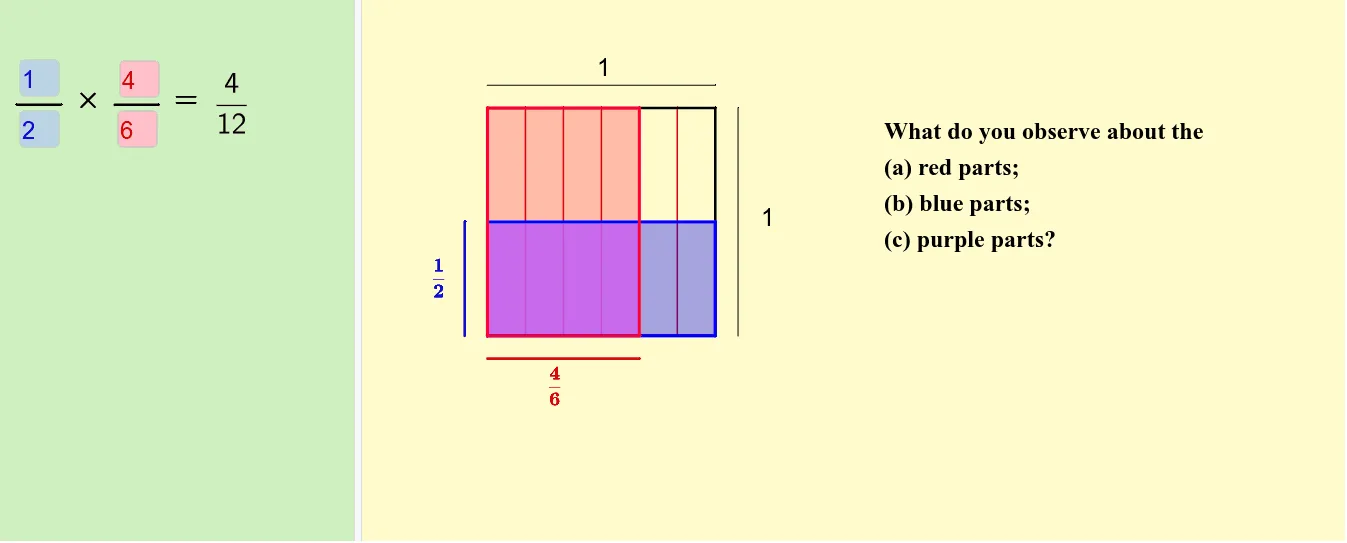
This example demonstrates the geometric interpretation and calculation process of multiplying two proper fractions. It involves core mathematical concepts such as the rule of fraction multiplication, area calculation, and geometric representation. The construction utilizes GeoGebra commands and objects like Sequence, Element, Segment, Midpoint, Polygon, GCD, Textfield, IntersectPath, Intersect. It is suitable for middle school mathematics teaching to help students visually understand fraction multiplication operations.
GeoGebra Commands & Parameters
Sequence(A + (i / n * (B - A)), i, 1, n) → abSequence(A + (i / m * (D - A)), i, 1, m) → daElement(da, p) → G1Segment(A, B) → aSegment(B, C) → bSegment(C, D) → cSegment(D, A) → dSequence(D + (i / n * (C - D)), i, 1, n) → cdSequence(B + (i / m * (C - B)), i, 1, m) → bcSequence(Segment[Element[cd, i], Element[ab, i]], i, 1, n) → ColumnSequence(Segment[Element[bc, i], Element[da, i]], i, 1, m) → RowElement(ab, q) → ESegment(AX, EX) → eMidpoint(e) → FSegment(AY, GY) → fMidpoint(f) → HElement(cd, q) → E1Element(bc, p) → GPolygon(A, B, G, G1) → Fraction1, a_1, b_1, g, g1Polygon(A, E, E1, D) → Fraction2, a_2, e_1, e1, d_1GCD(p, m) → FPB1GCD(q, n) → FPB2Segment(BY, GY1) → hMidpoint(h) → MSegment(DX, EX1) → iMidpoint(i) → NTextfield(p) → Numerator1Textfield(m) → Denominator1Textfield(q) → Numerator2Textfield(n) → Denominator2Textfield(j) → LengthGCD(p1Xq1, m1Xn1) → FPB3IntersectPath(Fraction1, Fraction2) → Result, I, J, K, L, k, l, t, f_1Polygon(A, B, C, D) → Original, a_3, b_2, c_1, d_2Segment(J, E) → g_1Segment(K, I) → h_1Intersect(g_1, h_1) → OSegment(P, Q) → i_1Segment(R, S) → j_1Textfield(o) → InputBox1Segment(AX1, T) → k_1Segment(V, U) → l_1