
Demonstration of Addition of Like Fractions
Loading the math board and drawing, please wait…
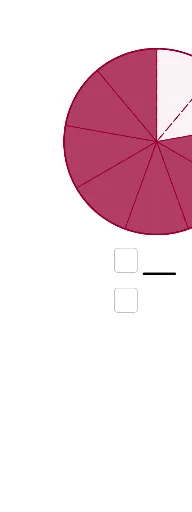
This example demonstrates the calculation process and geometric representation of addition of like fractions; core math concepts include fraction addition, Greatest Common Divisor (GCD), Least Common Multiple (LCM), and logical reasoning; construction highlights involve using Random command to generate random numbers, GCD command to calculate the greatest common divisor, and commands like Segment, Point, Circle for geometric drawing, along with Textfield and Text commands for displaying text information, and Sequence command for creating sequences; suitable for junior high school mathematics teaching, helping students visually understand fraction addition operations and geometric meanings.
GeoGebra Commands & Parameters
Random(3, 16) → zNRandom(2, zN - 1) → zZ1Random(1, zZ1 - 1) → zZ2GCD(ZE, zN) → ggTEGCD(zN, zZ2) → ggT2GCD(zN, zZ1) → ggT1Segment((1, 0), (8, 0)) → aPoint(a) → M2Point(a) → M1Circle(M1, 3) → c1Circle(M2, 3) → c2Point(c2) → BTextfield(EingabeZ2) → Textfeld3Textfield(EingabeZE) → Textfeld5Textfield(EingabeZ1) → Textfeld1Textfield(EingabeN1) → Textfeld2Text(zZ1) → TextZ1Textfield(EingabeN2) → Textfeld4Textfield(EingabeNE) → Textfeld6Text(ZEg) → TextZEgSegment(E, F) → mSegment(G, H) → m_1Text(Z1g) → TextZ1gText(N1g) → TextN1gText(N2g) → TextN2gText(zZ2) → TextZ2Text(NEg) → TextNEgText(ZE) → TextZEText(Z2g) → TextZ2gSegment((0.5882857142857141, -4.2730476190476185), D) → lSequence(Rotate[A, (k * α), M1], k, 0, zN) → LPunkte1Sequence(Rotate[B, (k * α), M2], k, 0, zN) → LPunkte2Sequence(CircleSector[M1, Element[LPunkte1, j], Element[LPunkte1, j + 1]], j, 1, zN) → LSektN1Sequence(CircleSector[M2, Element[LPunkte2, j], Element[LPunkte2, j + 1]], j, 1, zN) → LSektN2Sequence(CircleSector[M1, Element[LPunkte1, j], Element[LPunkte1, j + 1]], j, 1, zZ1) → LSektZ1Sequence(CircleSector[M2, Element[LPunkte2, j], Element[LPunkte2, j + 1]], j, 1, zZ2) → LSektZ2Text(zN) → TextN
AI Drawing Prompt Reference
Create a geometric illustration demonstrating the calculation and visual representation of adding like fractions. Start by placing two points on a horizontal line and draw two circles with radius 3 centered at these points. Randomly generate two fractions and represent their geometric parts using the intersections of the circles. Display the fraction values and calculation steps. Use sectors to illustrate the addition of fractions, with the number and angles of sectors corresponding to the numerators of the fractions. Finally, add text labels to explain the entire illustration and the calculation process.
The prompt above was compiled from the original drawing commands and is for reference only.