
Demonstrating Cone Volume Calculation
Loading the math board and drawing, please wait…
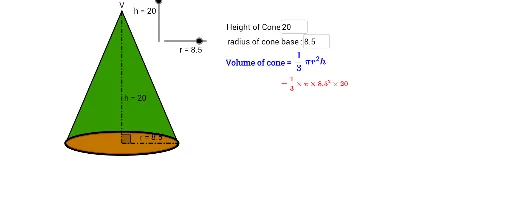
This example demonstrates how to calculate the volume of a cone dynamically. Core mathematical concepts include the cone volume formula, pi, geometric transformations, and parametric equations. The construction utilizes GeoGebra commands and objects like If, Conic, Segment, Midpoint, Point, Distance, Rotate, CircleSector, Polygon, Intersect, Arc, Circumference, Angle, CircumcircleArc, and Textfield to visually show how the volume changes with the base radius and height. Suitable for high school solid geometry teaching, helping students intuitively understand the volume calculation formula and its derivation process.
GeoGebra Commands & Parameters
If(net < -1, (((-net) - 1) * 3), 0) → net_θIf(net < -1, (3 * ((-net) - 1)) + 0.2, 0.2) → net_bIf(net < -1, -1, net) → net_eIf(net_e > -0.001, 0, (-net_e)) → net_hConic(A, B, C, D, E) → cIf(net > 0, 1, 0) → net_1Conic(A, B, C, D, E) → dSegment(V, A') → bSegment(V, F') → eMidpoint(A', F') → M_{A'F'}Point(c) → GConic(A', B', C', F', E') → kConic(A', B', C', F', E') → pDistance(O, V) → distanceOVSegment(O_c, O_u) → lRotate(O_o, (θ * 2), V) → HRotate(O_o, ((-θ) * 2), V) → H'CircleSector(V, H', H) → qPolygon(V, A', F') → poly1, f', v, aDistance(V, H') → distanceVH'Segment(V, H) → b'Segment(V, H') → e'Intersect(p, b') → K, K_2Intersect(p, e') → J, J_2Segment(V, J_2) → gSegment(V, K_2) → iArc(p, A', K_2) → tArc(p, J_2, F') → fIf(θ + (0.6 * θ_d) < (((2 * π) * r / l_s) * 0.5), θ + (0.6 * θ_d), (((2 * π) * r / l_s) * 0.5)) → θ_cRotate(O_o, θ_c, V) → H_1Rotate(O_o, (-θ_c), V) → H'_1CircleSector(V, H'_1, H_1) → c_2Circumference(c_2) → jCircumference(c) → circumferencecDistance(V, H'_1) → distanceVH'1Angle(H'_1, V, H_1) → αPoint(c_2) → ICircumcircleArc(H', O_o, H) → c_1CircleSector(V, H'_1, H_1) → sSegment(M_{A'F'}, F') → mSegment(M_{A'F'}, V) → nAngle(F', M_{A'F'}, V) → βMidpoint(b) → M_{VA'}Textfield(r) → inputBox1Textfield(h) → inputBox2