
Demonstrating Complex Number Addition
Loading the math board and drawing, please wait…
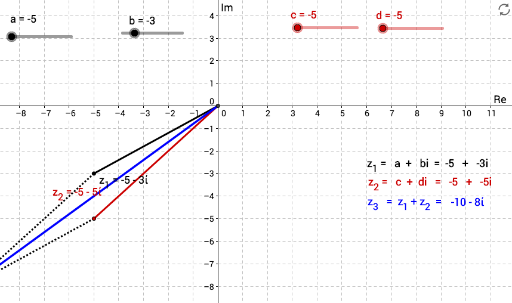
This example visually demonstrates the addition of complex numbers by representing them as vectors in the plane, intuitively showing the geometric meaning of addition. The core mathematical concepts involved include complex numbers, vectors, plane geometry, and algebraic operations on complex numbers. The construction utilizes GeoGebra commands and objects such as Intersect, Vector, Point, Segment, and Polygon to build a geometric model of complex number addition. It is suitable for high school mathematics teaching, helping students understand the essence of complex number addition and enhancing their spatial reasoning skills.
GeoGebra Commands & Parameters
Intersect(yAxis, xAxis) → OVector(O, (c, d)) → uVector(O, (a, b)) → vPoint(O, v) → z_1Point(O, u) → z_{2}Segment(O, z_1) → gSegment(O, z_{2}) → hPoint(z) → z_3Segment(z_{2}, z_3) → eSegment(z_1, z_3) → fSegment(O, z_3) → jPolygon(A, B, C, D) → poly1, a_1, b_1, c_1, d_1
AI Drawing Prompt Reference
Draw vectors representing two complex numbers on a plane to demonstrate their addition. Start by plotting the intersection of the coordinate axes, then draw vectors for the complex numbers. Create line segments from the origin to the ends of these vectors. Connect the ends of the vectors to the end of their sum, and form a polygon with these points to visually show the geometric meaning of complex number addition.
The prompt above was compiled from the original drawing commands and is for reference only.