
Decimal Variable Expression Practice
Loading the math board and drawing, please wait…
In collections
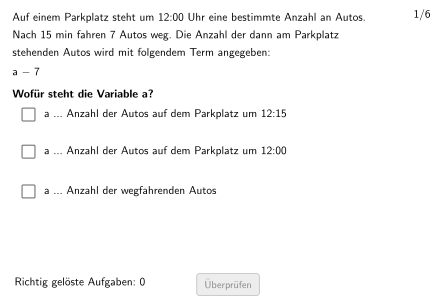
Wiederholung: Variablen, Terme und Gleichungen
This is an interactive algebra exercise designed to help students understand and define variable meanings. The example demonstrates how to assign values to variables and evaluate expressions with decimals. Key mathematical concepts include variable concepts, expression evaluation, and decimal operations. Construction highlights: Using Textfield for answer input, If condition to verify answers, Shuffle and Sequence commands to randomly generate questions, Polygon and RoundBox for creating question cards, and checkboxes for batch grading. Suitable for grade 5-6 students, this exercise can be used for classroom practice or homework review, helping students master basic algebraic expression construction and calculation.
GeoGebra Commands & Parameters
Segment(Corner[HilfsText, 1], Corner[HilfsText, 2] - (0, 0)) → dxHilfsStreckeSequence(Pos1 + (i * (0, Listdy)), i, 0, 2) → PosShuffle({"a", "b", "c", "d", "e", "f", "g", "h", "i", "j", "k", "l", "m", "n", "k", "p", "q", "r", "s", "t", "u", "v", "w", "y", "z"}) → alphabetWithoutX, {"t", "r", "m", "u", "p", "k", "y", "a", "s", "n", "j", "d", "q", "b", "g", "h", "c", "v", "k", "z", "e", "i", "f", "l", "w"}Shuffle(Sequence[Random[1, Length[alphabetWithoutX]], i, 1, 100]) → randomNosVariable, {5, 18, 18, 9, 13, 19, 10, 5, 18, 8, 9, 21, 22, 7, 15, 12, 17, 7, 16, 18, 10, 11, 8, 7, 3, 2, 15, 18, 1, 22, 17, 9, 21, 4, 18, 17, 4, 5, 19, 14, 12, 15, 1, 6, 18, 16, 16, 15, 18, 11, 21, 5, 2, 15, 18, 15, 15, 4, 24, 19, 12, 4, 23, 16, 16, 9, 16, 4, 24, 22, 25, 11, 3, 13, 21, 15, 4, 4, 22, 12, 3, 1, 10, 1, 5, 8, 21, 12, 12, 19, 3, 10, 14, 12, 10, 20, 2, 16, 23, 25}Shuffle(Sequence[Random[1, 6], i, 1, 100]) → randomNosCase, {1, 4, 5, 6, 2, 4, 5, 5, 2, 1, 3, 4, 1, 1, 5, 4, 4, 5, 1, 5, 4, 3, 1, 2, 3, 6, 6, 5, 3, 2, 5, 3, 2, 1, 2, 4, 2, 4, 4, 3, 2, 2, 3, 6, 5, 6, 4, 2, 5, 6, 1, 1, 5, 1, 5, 5, 3, 4, 2, 5, 4, 2, 6, 5, 1, 4, 5, 3, 3, 2, 5, 4, 1, 2, 1, 5, 2, 1, 4, 1, 5, 1, 6, 4, 4, 4, 6, 6, 3, 6, 6, 1, 3, 1, 3, 2, 1, 2, 3, 4}Shuffle(Sequence[Random[1, 10], i, 1, 100]) → randomNosConstant, {1, 8, 2, 10, 5, 3, 10, 4, 3, 8, 2, 8, 7, 1, 2, 8, 7, 8, 2, 4, 10, 5, 7, 1, 1, 3, 2, 1, 6, 8, 10, 3, 3, 7, 10, 9, 3, 1, 3, 5, 8, 8, 4, 5, 8, 6, 7, 3, 9, 2, 6, 8, 8, 6, 8, 5, 6, 2, 10, 10, 10, 10, 3, 4, 8, 6, 3, 9, 8, 9, 7, 6, 8, 9, 7, 8, 8, 6, 5, 10, 1, 6, 6, 1, 7, 6, 4, 4, 8, 2, 7, 1, 8, 8, 1, 1, 3, 4, 8, 9}Shuffle(Sequence[Random[1, Length[verbVer]], i, 1, 100]) → randomNosVerbVer, {3, 1, 3, 3, 3, 2, 3, 2, 2, 3, 1, 1, 2, 3, 3, 1, 3, 2, 1, 3, 1, 2, 1, 1, 3, 3, 2, 2, 1, 3, 3, 3, 1, 1, 2, 2, 1, 3, 1, 1, 3, 2, 3, 1, 2, 3, 3, 3, 2, 3, 1, 3, 1, 1, 2, 2, 2, 3, 1, 1, 2, 2, 3, 2, 1, 2, 1, 1, 1, 3, 2, 3, 1, 1, 1, 2, 2, 1, 1, 2, 1, 2, 1, 1, 1, 1, 1, 2, 3, 2, 3, 2, 2, 1, 3, 2, 1, 2, 2, 1}Element(randomNosVariable, Mod[questionCount, 20] + 1) → numVariableElement(randomNosCase, Mod[questionCount, 100] + 1) → numCaseElement(randomNosConstant, Mod[questionCount, 100] + 1) → numConstantRestElement(randomNosVerbVer, Mod[questionCount, 100] + 1) → numVerbVerIf(numCase ≟ 2, numConstantCase2, numConstantRest) → numConstantIf(checkbox1, ptopLeftCornerFeedbacks(1), If[checkbox2, ptopLeftCornerFeedbacks(2), If[checkbox3, ptopLeftCornerFeedbacks(3)]]) → PtopLeftCornerFeedbackShuffle(Sequence[Random[1, 3], i, 1, 100]) → randomNosPositionAnswerCorrect, {1, 1, 2, 1, 2, 2, 3, 1, 3, 2, 2, 2, 3, 3, 3, 2, 1, 3, 1, 2, 3, 2, 1, 3, 2, 2, 3, 3, 3, 1, 1, 2, 1, 1, 3, 1, 2, 2, 2, 3, 2, 3, 2, 1, 1, 2, 2, 1, 2, 1, 2, 3, 2, 3, 3, 1, 2, 3, 1, 3, 3, 1, 1, 3, 1, 1, 1, 3, 1, 2, 2, 2, 1, 1, 3, 2, 3, 3, 2, 1, 2, 2, 1, 1, 3, 1, 1, 3, 3, 1, 1, 3, 2, 2, 1, 2, 3, 1, 1, 1}Element(randomNosPositionAnswerCorrect, Mod[questionCount, 100] + 1) → numPositionAnswerCorrectTextfield(aInput) → InputBox1Textfield(bInput) → InputBox2Polygon(PtopLeftCornerFeedback, PtopRightCornerFeedback, PbottomRightCornerFeedback, PbottomLeftCornerFeedback) → rectangleCorrect, ptopleftcornerfeedback, ptoprightcornerfeedback, pbottomrightcornerfeedback, pbottomleftcornerfeedbackSequence(RandomElement[Remove[Sequence[3], {randomNosPositionAnswerCorrect(i)}]], i, 1, 100) → randomNosPositionAnswerWrong1, {2, 3, 3, 2, 3, 3, 2, 2, 2, 3, 3, 3, 2, 1, 1, 1, 3, 1, 3, 3, 2, 3, 2, 2, 3, 1, 1, 2, 2, 3, 3, 1, 3, 2, 2, 3, 1, 3, 3, 2, 1, 2, 1, 2, 2, 3, 1, 3, 3, 3, 1, 2, 1, 2, 1, 2, 1, 1, 2, 1, 1, 3, 3, 2, 2, 3, 3, 1, 2, 3, 3, 3, 3, 2, 1, 3, 2, 1, 1, 2, 1, 1, 3, 2, 1, 2, 2, 1, 1, 3, 2, 1, 3, 1, 3, 1, 2, 3, 2, 2}Element(randomNosPositionAnswerWrong1, Mod[questionCount, 100] + 1) → numPositionAnswerWrong1Sequence(RandomElement[Remove[Remove[Sequence[3], {randomNosPositionAnswerCorrect(i)}], {randomNosPositionAnswerWrong1(i)}]], i, 1, 100) → randomNosPositionAnswerWrong2, {3, 2, 1, 3, 1, 1, 1, 3, 1, 1, 1, 1, 1, 2, 2, 3, 2, 2, 2, 1, 1, 1, 3, 1, 1, 3, 2, 1, 1, 2, 2, 3, 2, 3, 1, 2, 3, 1, 1, 1, 3, 1, 3, 3, 3, 1, 3, 2, 1, 2, 3, 1, 3, 1, 2, 3, 3, 2, 3, 2, 2, 2, 2, 1, 3, 2, 2, 2, 3, 1, 1, 1, 2, 3, 2, 1, 1, 2, 3, 3, 3, 3, 2, 3, 2, 3, 3, 2, 2, 2, 3, 2, 1, 3, 2, 3, 1, 2, 3, 3}Element(randomNosPositionAnswerWrong2, Mod[questionCount, 100] + 1) → numPositionAnswerWrong2If(checkbox1, Pos(1), checkbox2, Pos(2), Pos(3)) → CRoundBox(radius, C, dy, dx) → c, d, Vieleck1, e, fTranslate(Pos, (dxHilfsStrecke + 1, 0)) → Pos2If(checkbox1, Pos2(1), checkbox2, Pos2(2), Pos2(3)) → PosFBPoint(xAxis) → DOrthogonalLine(D, xAxis) → gRoundBox(radius, PosRichtigeOption, dy, FBdx) → Vieleck2, h, Vieleck3, k, p
AI Drawing Prompt Reference
Draw a graph containing multiple circles and rectangles, including correct and incorrect answer options. The graph features a circle representing the correct answer and four rectangles representing incorrect answers. The positions and sizes of the circles and rectangles will be adjusted based on randomly generated values. Please add a text input box to the graph for users to input their answers.
The prompt above was compiled from the original drawing commands and is for reference only.