
Decimal Division 1.5/3 Demonstration
Loading the math board and drawing, please wait…
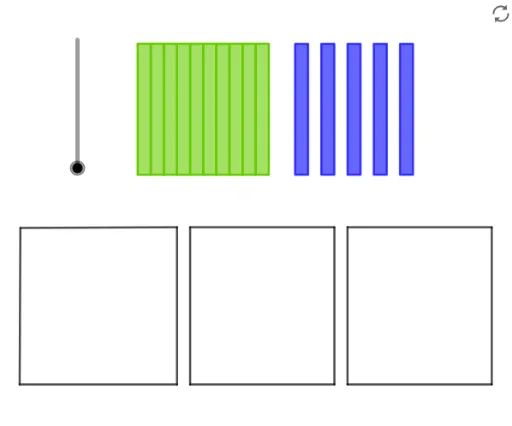
This example demonstrates the decimal division calculation of 1.5 by 3, visualizing the process and result. Core math concepts include decimal division, rational number operations, and equation representation. GeoGebra commands/objects used in construction are Segment, Sequence, Point, Join, If, Element. Suitable for middle school mathematics teaching, helping students understand the geometric meaning and calculation method of decimal division.
GeoGebra Commands & Parameters
Segment(A, B) → fSegment(B, D) → gSegment(D, C) → hSegment(C, A) → iSegment(F, G) → jSegment(G, H) → kSegment(H, E) → lSegment(E, F) → mSegment(J, L) → nSegment(L, K) → pSegment(K, I) → qSegment(I, J) → rSequence((k, 15), k, 8, 18) → l1Sequence((k, 25), k, 8, 18) → l2Sequence(Polygon[Element[l1, k], Element[l1, k + 1], Element[l2, k + 1], Element[l2, k]], k, 1, 10) → l3Sequence((k, 15), k, 20, 29) → l4Sequence((k, 25), k, 20, 29) → l5Sequence(Polygon[Element[l4, k], Element[l4, k + 1], Element[l5, k + 1], Element[l5, k]], k, 1, 10, 2) → l6Sequence((k, 0), k, 1, 9, 2) → l7Sequence((k, 0), k, 13, 21, 2) → l8Sequence((k, 0), k, 25, 33, 2) → l9Sequence(Element[l1, k], k, 1, 11, 3) → l10Point(l6) → MJoin({l10, l11}) → l12Sequence(Vector[Element[l12, k], Element[l7, k]], k, 1, 5) → l13Sequence(Element[l1, k], k, 2, 10, 3) → l14Point(l6) → NPoint(l6) → OJoin({l14, l15}) → l16Sequence(Vector[Element[l16, k], Element[l8, k]], k, 1, 5) → l17Sequence(Element[l1, k], k, 3, 10, 3) → l18Point(l6) → PPoint(l6) → QJoin({l18, l19}) → l20Sequence(Vector[Element[l20, k], Element[l9, k]], k, 1, 5) → l21If(0 ≤ a < 1, Vector[Dilate[Element[l13, 1], a]], Vector[If[a ≥ 1, Vector[Element[l13, 1]]]]) → uIf(1 ≤ a < 2, Vector[Dilate[Element[l17, 1], a - 1]], Vector[If[a ≥ 2, Vector[Element[l17, 1]]]]) → vIf(2 ≤ a < 3, Vector[Dilate[Element[l21, 1], a - 2]], Vector[If[a ≥ 3, Vector[Element[l21, 1]]]]) → wIf(3 ≤ a < 4, Vector[Dilate[Element[l13, 2], a - 3]], Vector[If[a ≥ 4, Vector[Element[l13, 2]]]]) → bIf(4 ≤ a < 5, Vector[Dilate[Element[l17, 2], a - 4]], Vector[If[a ≥ 5, Vector[Element[l17, 2]]]]) → cIf(5 ≤ a < 6, Vector[Dilate[Element[l21, 2], a - 5]], Vector[If[a ≥ 6, Vector[Element[l21, 2]]]]) → dIf(6 ≤ a < 7, Vector[Dilate[Element[l13, 3], a - 6]], Vector[If[a ≥ 7, Vector[Element[l13, 3]]]]) → eIf(7 ≤ a < 8, Vector[Dilate[Element[l17, 3], a - 7]], Vector[If[a ≥ 8, Vector[Element[l17, 3]]]]) → sIf(8 ≤ a < 9, Vector[Dilate[Element[l21, 3], a - 8]], Vector[If[a ≥ 9, Vector[Element[l21, 3]]]]) → tIf(9 ≤ a < 10, Vector[Dilate[Element[l13, 4], a - 9]], Vector[If[a ≥ 10, Vector[Element[l13, 4]]]]) → u_1If(10 ≤ a < 11, Vector[Dilate[Element[l17, 4], a - 10]], Vector[If[a ≥ 11, Vector[Element[l17, 4]]]]) → v_1If(11 ≤ a < 12, Vector[Dilate[Element[l21, 4], a - 11]], Vector[If[a ≥ 12, Vector[Element[l21, 4]]]]) → w_1If(12 ≤ a < 13, Vector[Dilate[Element[l13, 5], a - 12]], Vector[If[a ≥ 13, Vector[Element[l13, 5]]]]) → a_1If(13 ≤ a < 14, Vector[Dilate[Element[l17, 5], a - 13]], Vector[If[a ≥ 14, Vector[Element[l17, 5]]]]) → b_1If(14 ≤ a < 15, Vector[Dilate[Element[l21, 5], a - 14]], Vector[If[a ≥ 15, Vector[Element[l21, 5]]]]) → c_1Join({l3, l6}) → l23Sequence(Translate[Element[l23, k], Vector[Element[l22, k]]], k, 1, 15) → l24Element(l3, 1) → q1Element(l3, 2) → q2Element(l3, 3) → q3Element(l3, 4) → q4Element(l3, 5) → q5Element(l3, 6) → q6Element(l3, 7) → q7Element(l3, 8) → q8Element(l3, 9) → q9Element(l3, 10) → q10Element(l6, 1) → q11Element(l6, 2) → q12Element(l6, 3) → q13Element(l6, 4) → q14Element(l6, 5) → q15
AI Drawing Prompt Reference
Create a visual representation demonstrating the decimal division of 1.5 by 3, highlighting core math concepts like decimal division, rational number operations, and equation representation. Start by drawing a square composed of four line segments. Inside the square, construct two sets of parallel quadrilaterals to represent the division of 1.5 and 3. Connect the vertices of these quadrilaterals and the square to form multiple triangles, using distinct colors or line styles. Finally, add dynamic vectors that scale or maintain their original length based on the input value 'a', showing the result of the division in three directions.
The prompt above was compiled from the original drawing commands and is for reference only.