
Cylinder Net in HTML5
Loading the math board and drawing, please wait…
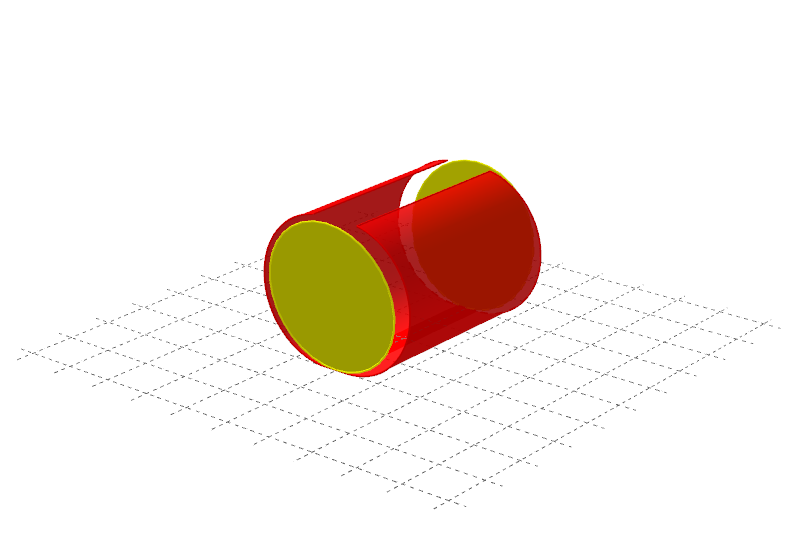
This example demonstrates the net of a cylinder and its dynamic changes. It involves core mathematical concepts such as solid geometry, geometric construction, and parametric equations. Key GeoGebra commands used include Cylinder, Polygon, CircleArc, Segment, Circle, and Surface. Suitable for high school students and math enthusiasts to learn solid geometry and spatial visualization.
GeoGebra Commands & Parameters
Cylinder(B, C, r) → a, c, d, bPolygon(C_2, B_2, A_1, A_2) → Vieleck1, c_2, b_2, a_1, a_2Polygon(A_2, C_1, B_1, A_1) → Vieleck2, a_3, c_1, b_1, a_4CircleArc(M_2, P_2, B_2) → eCircleArc(N_2, Q_2, C_2) → fCircleArc(N_1, Q_1, C_1) → gCircleArc(M_1, P_1, B_1) → kSegment(Q_2, P_2) → iSegment(Q_1, P_1) → jCircle(KU2, KL2, KR2) → pCircle(KU1, KR1, KL1) → qSurface(x(M_2) - (r * cos(u)), (-v), z(M_2) - (r * sin(u)), u, 90*°, 270° - t, v, 0, h) → Seite1Surface(x(M_1) + (r * cos(u)), (-v), z(M_1) + (r * sin(u)), u, 90° + t, 270*°, v, 0, h) → Seite2
AI Drawing Prompt Reference
Draw the net of a cylinder, showing its surface unfolded into a plane. Include two circular bases and a rectangular lateral surface that is divided into two curved panels, each bounded by an arc and a straight segment. The figure illustrates how the cylinder's curved side flattens into two arcs connected by straight lines, with the circles positioned at the ends. The overall shape demonstrates the transition from a 3D cylinder to its 2D net.
The prompt above was compiled from the original drawing commands and is for reference only.