
Cross Sections of Rectangular Prisms by Daniel Grubbs
Loading the math board and drawing, please wait…
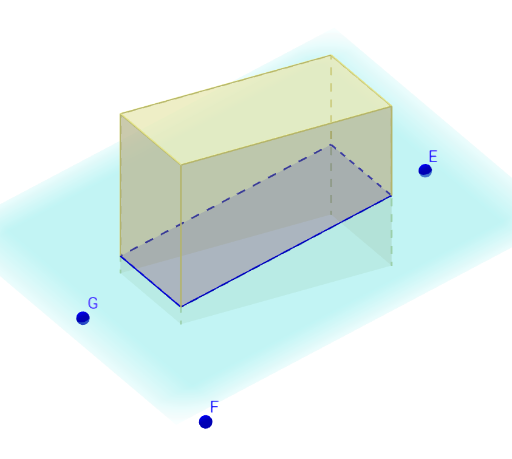
This example demonstrates the various cross-sectional shapes formed by slicing through a rectangular prism at different angles. It involves core concepts like solid geometry, cross-sections, polygons, angles, similarity, and congruence. Constructed using commands such as Polygon, Prism, Plane, IntersectPath, and Angle, allowing users to explore how parameters affect the resulting shapes. Ideal for high school geometry instruction and exploratory learning.
GeoGebra Commands & Parameters
Polygon({(2, 4), (2, -4), (-2, -4), (-2, 4)}) → poly1Prism(poly1, 6) → recPrism, A, edge1, edge2, edge3, edge4, edge5, edge6, edge7, edge8, B, C, D, face1, face2, face3, face4, face5Plane(E, F, G) → bIntersectPath(b, recPrism) → poly2, H, i, j, k, I, J, K, L, M, f, g, hAngle(poly2) → α, β, γ, δ, ε, α_1
AI Drawing Prompt Reference
Draw a rectangular prism and slice it at various angles to display different cross-sectional shapes like triangles and quadrilaterals, labeling the angles for geometric instruction.
The prompt above was compiled from the original drawing commands and is for reference only.