
Cross Section of a Square Pyramid
Loading the math board and drawing, please wait…
In collections
Cross Sections
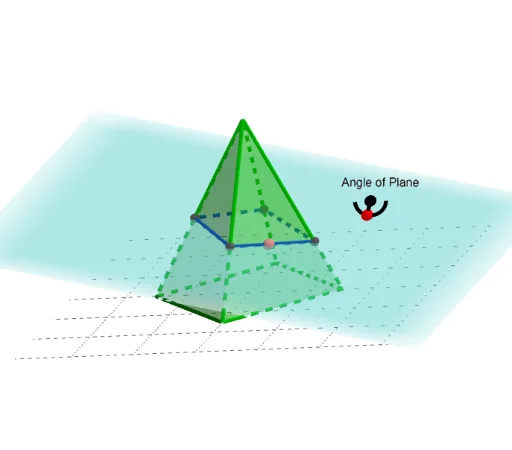
This GeoGebra example demonstrates the cross section of a square pyramid when intersected by a plane, showing how the shape of the section changes as the cutting plane moves. It illustrates core concepts in solid geometry: pyramids, plane-section intersections, and the resulting polygonal cross-sections (e.g., triangles, quadrilaterals). The construction uses commands such as Point, Polygon, Pyramid, Plane, PointIn, Circle, Line, Intersect, OrthogonalLine, CircleArc, Segment, OrthogonalPlane, and IntersectPath to build the pyramid, define the cutting plane, and compute the intersection path. Additional elements like Tangent Line, Percentages, Kite, and Cosine are used to annotate angles and proportions. This resource is suitable for high school or early college students learning spatial reasoning and dynamic geometry, as well as for teachers demonstrating cross-section properties in the classroom.
GeoGebra Commands & Parameters
Point(xAxis) → APoint(xAxis) → WPoint(yAxis) → VPolygon(V, W, 4) → poly1, n, q, r, s, Z, A_1Pyramid(poly1, c) → ThePyra, B_1, face3, face5, face6, face4, edge2, edge3, edge4, edge5Point(zAxis) → OPoint(xAxis) → KPoint(yAxis) → JPoint(xAxis) → IPlane(I, K, O) → bPlane(I, J, K) → pPointIn(b) → CenterOfNormalAngleCircle(CenterOfNormalAngle, 0.25, b) → dLine(CenterOfNormalAngle, xAxis) → gPoint(yAxis) → BPoint(Circle[B, Distance[A, B], Segment[A, B]]) → CIntersect(xAxis, yAxis) → MOrthogonalLine(CenterOfNormalAngle, g, b) → hIntersect(g, d) → i_1, i_2CircleArc(CenterOfNormalAngle, i_1, i_2, b) → ArcForPlaneAnglePoint(ArcForPlaneAngle) → NormalAngleHandleSegment(CenterOfNormalAngle, NormalAngleHandle) → NormalSegPointIn(ThePyra) → SliceChooserOrthogonalPlane(SliceChooser, NormalSeg) → PerPenPlaneIntersectPath(PerPenPlane, ThePyra) → poly2, D, l, E, F, G, H, f, i, j, k
AI Drawing Prompt Reference
Draw a square pyramid with its base on the coordinate plane. Choose a point inside the pyramid and construct a plane through that point perpendicular to a given direction, intersecting the pyramid to form a polygonal cross-section. Also, create an auxiliary plane outside the pyramid to indicate the cutting direction, with a circle and an arc on it, where a movable point on the arc adjusts the tilt angle. Place several points on the coordinate axes and connect them to form auxiliary triangles for angle annotation. Show how the cross-section shape changes as the plane moves and tilts.
The prompt above was compiled from the original drawing commands and is for reference only.